 Fluke Networks has developed an approach that even small businesses can adapt for their networks. As a result, even novice technicians can resolve issues as quickly as, and even faster than, the most experienced technicians. This allows the company to recoup its investment in about a month.
Ad hoc checks are a waste of time.
Many network operations require minimal human intervention.
Automated network management systems monitor network performance by collecting essential statistical data and comparing it to predefined limits. If, for example, a device is taking too long to respond or a network link is experiencing excessive traffic, the network management system notifies staff so they can take appropriate action.
Some network operations (primarily installation and troubleshooting) are typically less automated. In many cases, the required checks are minimal; for example, a technician simply needs to check if the link light is on to confirm connectivity.
Troubleshooting depends entirely on the technician's qualifications:
If they have the appropriate level of expertise, they can resolve problems relatively quickly; otherwise, they can drag on indefinitely. Even expert attempts can be unsuccessful if the technician doesn't fully understand the network connectivity issue. When someone says, "This is how it should be fixed," do they know for sure that the correction will actually solve the problem, or are they relying on mere probability?
The result of an ad hoc approach to troubleshooting network problems is that time is wasted applying multiple fixes, and ultimately, the issue must be escalated to more highly qualified engineers. The resulting decrease in user satisfaction does nothing to enhance the reputation of the IT department.
Standardizing checks saves time and yields better results.
Years ago, telephone companies faced similar problems, but on a much larger scale. With thousands of technicians, their skill levels varied considerably. And with millions of customers, this inefficiency resulted in enormous losses of time and money, as well as widespread dissatisfaction. The biggest waste was the repetition of incidents, as a second or third visit was needed to resolve problems that should have been fixed on the first visit.
The solution was quite simple. First, telecommunications companies tasked their most qualified technicians and engineers with developing best practices for troubleshooting. By establishing a set of checks that anticipated all possible problems, they could guarantee the diagnosis of any issue on the first try. Second, the set of checks was standardized with standard operating procedures that technicians were required to follow every time they performed a task.
These comprehensive and repeatable procedures enabled operators to resolve problems more quickly, save more money, and increase customer satisfaction. Even in companies with thousands of technicians, reducing unnecessary expenses and increasing customer satisfaction remain top priorities.
What does a complete network connectivity check involve?
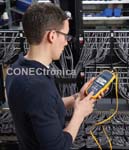
Fluke Networks has been manufacturing and distributing Ethernet testing equipment for nearly 20 years—in fact, we have more in use than any other manufacturer. Through collaboration with thousands of customers and technology developers worldwide, we have unparalleled expertise in troubleshooting Ethernet. Based on our networking knowledge, we have established that a complete standard operating procedure for testing Ethernet ports should include the following.
 1. Cabling.
Cabling is one of the most common causes of network problems. It's one of the few parts of the network that's within easy reach of end users, so it's no surprise that things often go wrong. Cables get tangled in chair wheels, and plugs are ripped out of walls. Users try to use cables they find wherever they can. Patch cords are wedged into the sharp corners of filing cabinets until they snap. It's essential to perform the necessary checks to locate these and other cabling-related problems.
2. Link, Speed, and Duplex
Currently, desktop Ethernet offers three speeds (10 Mbps, 100 Mbps, and 1 Gigabit) and three different duplex settings (half-duplex, bidirectional, and auto). Depending on the switch and PC configuration, three scenarios are possible. One: Everything works perfectly, which is the most common situation. Two: Nothing works; it might take a while to resolve the problem, but it will eventually be fixed. Three: Ethernet only works to a certain extent. This error, which is the most frustrating, may not appear until something changes, for example, until a VoIP phone is added or traffic increases, at which point the network becomes very slow. This problem can leave even experts stumped for days, so understanding these settings is crucial.
3. Incorrectly Labeled Cabling
The most common cabling error is not a broken cable, but one that is incorrectly labeled. If the user connects to the wrong VLAN, switch, or port, communication may be completely interrupted, or response times may simply be slowed.
4. Network Services:
If network services such as DNS or DHCP cannot be accessed from the user's desktop, symptoms may range from slow performance to a complete loss of communication. A quick check of these services will help rule out such problems.
5. Power over Ethernet (PoE)
The number of PoE devices is increasing rapidly as businesses implement technologies that facilitate the use of VoIP phones, security cameras, and wireless access points.
If a device won't power on, is the problem the cable, the device itself, or the switch supplying the power? And what if the power is minimal because the cable is incorrect or too long, or because the switch is overloaded? A PoE test can answer these questions.
6. Connectivity to Key Resources
Once all the basic issues from points 1-5 have been ruled out, the final question is whether the network can carry user traffic to the sites it needs to reach. For example: Can the user access the company intranet, email servers, or the cloud? Or are there any impediments blocking access?
Standardized Real-World Checks:
A comprehensive set of checks designed to address these issues greatly increases troubleshooting effectiveness, but comes at a significant time cost. A skilled user with a laptop needs about five minutes to perform these checks. They also need additional equipment such as a cable and a PoE tester. Less skilled users take longer and often don't know how to run some of these checks. Due to time constraints and complexity, a field technician is unlikely to perform a complete check without taking shortcuts to save time. And this is all without even considering the technician's experience level.
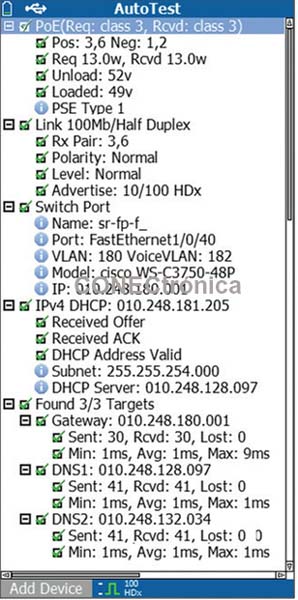
But what if all these essential checks could be performed faster than it would take a technician to complete a single one? The LinkRunner AT Automatic Network Tester performs these six essential checks in ten seconds—less time than it takes to open your laptop and launch just one of the applications required for a complete test.
LinkRunner AT also includes specialized hardware that checks certain functions (signal level and PoE) that are beyond the capabilities of even the most experienced technician.
Cable Checks – LinkRunner AT checks connection continuity and displays the cable length (even while connected).
If a cable problem is detected, the graphical display clearly shows its nature.
Link, speed, and duplex – LinkRunner performs the most comprehensive physical connection check available. It not only verifies the actual connection status, speed, duplex mode, and signal level but also reports on the switch's advertised configuration.
Cables with incorrect labeling, showing the name and IP address of the switch, slot and port closest to which the LinkRunner AT is connected.
 Network services: Checks the availability and performance of DHCP and DNS servers.
Power over Ethernet (PoE): Checks if you are receiving the necessary PoE current and voltage to power your PoE devices. LinkRunner TruePower™ PoE charging delivers actual power (including the new 25.5W Class 4 configuration) to verify that your PoE devices are receiving the power they need to function correctly.
Connectivity to key resources ensures that essential applications are available from the network port by performing a ping or TCP port openness check. A port openness check is more comprehensive than a ping check, as the latter is blocked by firewalls, interrupted if the link is busy, or ignored at the destination for security reasons.
This check can also determine if the application is running on the server.
The detailed results of each check immediately pinpoint the problem, so the technician knows exactly what to do to fix it. Because the check is quick and easy to perform, it's simple to repeat it after the repair to ensure that no other problems exist or that the corrective action didn't cause them.
These checks can be customized to meet specific requirements, and multiple checks can be defined (for example, for different sites or types of terminals such as PCs, VoIP phones, access points, or security cameras). Furthermore, the results can be saved as proof of successful completion or for consultation with experts in case of problems that the technician was unable to resolve independently.
Payback in just one month.
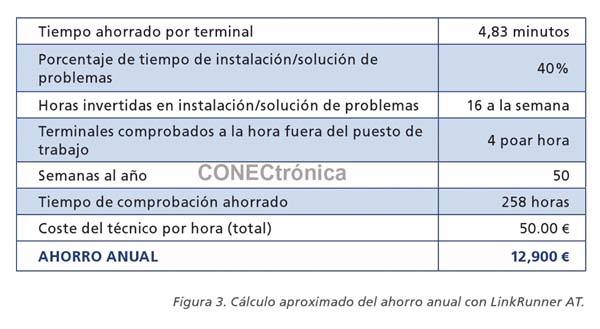
The value of a thorough and repeatable check can be determined with a simple calculation. The two basic variables are how much time the check saves and how often it is needed. The second variable is specific to each company and is conditioned by the size of the network, the number of moves, additions, and changes, as well as the installation of new technologies: the more any of these variables increases, the more the number of checks. A project such as the implementation of new VoIP phones or the relocation of a department results in dozens of checks per hour. In a recent Fluke Networks study, network professionals indicated that they spent around 40% of their time away from their workstations servicing networks and users. In the ROI chart shown below, it is assumed that the technician checks the network endpoint four times during each of those hours.
How much time does a structured approach save? The maximum is significant: LinkRunner AT detects problems in a ten-second automated check that have been stumping customer technicians for weeks. The time saved also depends on the technician's skill level. An expert can diagnose simple problems almost as quickly as LinkRunner AT. However, for other issues (such as PoE problems), it's nearly impossible to make an accurate diagnosis without running some diagnostic equipment.
To perform our calculations, we used the difference between the LinkRunner AT automatic check and the five minutes it would take an expert to reproduce such checks with a laptop and other basic tools.
As you can see, even with these very conservative estimates, the product becomes profitable in just over a month. What isn't included is the reduction in the number of visits or the improvements in user productivity that benefit from the decreased resolution time (which can be several times greater than what is calculated in the table in Figure 3).
Author:
Fluke Networks