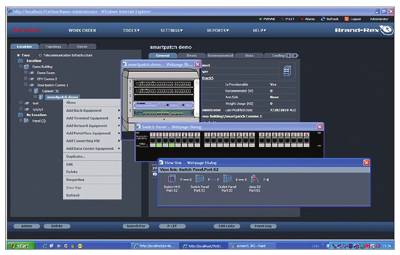
 It performs this function by providing real-time information on end-to-end physical connectivity and enabling the monitoring and maintenance of an infrastructure database from any remote location. SP4E allows the company to automate network documentation and maintenance procedures while simultaneously providing real-time database updates.
How does it work?
SP4E is based on a client/server application running on a relational SQL database and works in conjunction with the SNMP standard and an intelligent hardware network topology (SPMax and patch panels) to control, map, and monitor both the physical layer and active LA equipment.
SP4E also features a unique end-to-end system called -LE (proactive LA Equipment Opology) that tracks network connectivity from end-user equipment (computers, phones, printers, etc.) through connecting hardware to network equipment (LA switches, BXs, hubs, etc.).
The system administrator is provided with a real-time physical layer, which includes a combined view of the vertical and horizontal subsystems. A combination of graphical and real-time information helps the administrator make critical decisions regarding moves, additions, and changes (MACs) within the enterprise. These decisions are made for daily system maintenance, network troubleshooting and resolution, and documentation procedures. SP4E updates the network database to reflect the MAC and network device details, as well as their physical location on the network.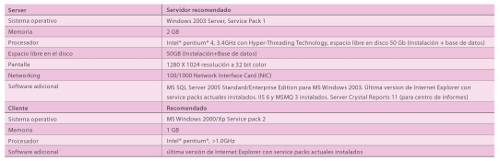 One of the most significant developments of the SP4E application is the provisioning module. This module is used to implement individual MACs, department reorganizations, or even server deployments in a simple and efficient manner, while respecting user-defined policies, using straightforward drag-and-drop operations.
To meet customer requirements, SP4E is now available in four standard packages that can be enhanced by adding additional modules.
The contents of each package are as follows:
Core
Sp4e + Reporting Center (1)
Standard
Sp4e + Reporting Center (1) + Discovery Module
Advanced
SP4E + Reporting Center (1) + Discovery Module + Provisioning Module
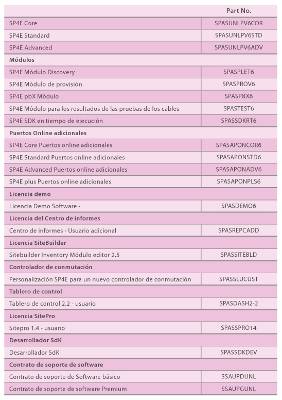 Optional Modules:
The Provisioning Module – enables the user to allocate system resources and privileges in a fully automated environment. It significantly improves planning and provisioning processes, including automated moves, adds, and changes (MA) for data centers and work environments. The module also allows users to incorporate their ownership rules.
Reporting Center – can be ordered for additional users.
The PBX Module – takes the information acquired from the pBX ports and maps the end-to-end connectivity between the pBX switching port and the telephone end device.
The Cable Test Results Module – contains data for electrical bond and channel cable tests for each port.
It includes an option to view the results using a PDF/flW viewer.
SitePro– offers the ability to access SP4E rack information via PDA.
The Developer SDK – enables developers to integrate S4E into third-party or legacy applications.
The SDK runtime enables customers to extend SP4E's capabilities across their organization by integrating it with third-party or legacy applications.
SiteBuilder is an Excel-based application that provides an alternative way to load large amounts of SP4E data into the SP4E database.
Additional ports/upgrades:
The modular nature of the application means it can be easily upgraded to the latest version and scaled to reflect network size changes.
Software support:
Support contracts are available for both upgrades and upgrades, and also offer a helpline, troubleshooting, free repairs, enhancement upgrades, and version upgrades.