The DECT ULE frequency range is 1880MHz – 1900MHz, and it has a maximum transmission power of 250mW. This device comes complete with everything needed for wall mounting. It includes an adhesive strip, screws, and wall plugs, and is powered by two AAA batteries.
Key features:
Customizable controls: The FRITZ!DECT 440 offers four programmable buttons allowing you to manage up to 12 FRITZ! devices or groups of devices. This includes turning devices on or off, adjusting the room temperature via the FRITZ!DECT radiator controls, and dimming or brightening the FRITZ!DECT 500 LED light to create the desired ambiance.
High-resolution e-paper display: Equipped with an anti-glare e-paper display, the device provides clear information on current ambient temperature and humidity levels, as well as the functions assigned to each button
Integrated temperature sensor: The integrated temperature sensor measures the ambient temperature, allowing it to be used as an external temperature indicator for FRITZ!DECT radiator controls. This feature ensures precise climate control based on the actual room conditions.
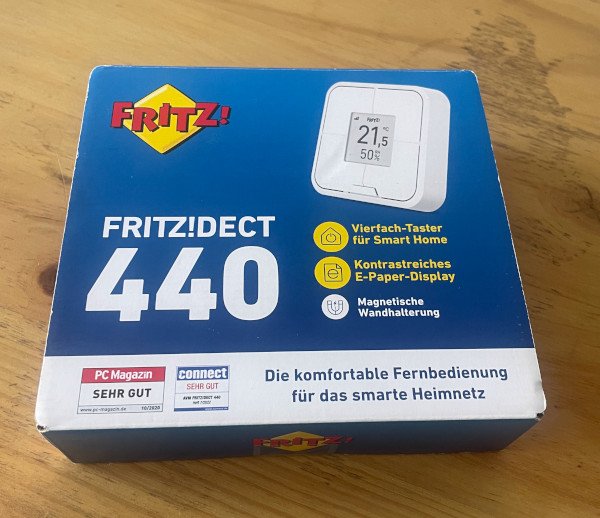
Flexible placement: The FRITZ!DECT 440 comes with a magnetic wall mount, allowing for easy placement and removal. It can be mounted using the included adhesive strip or screws, or simply placed on a surface without mounting, offering positioning flexibility.
Automatic updates: Regular firmware updates are delivered automatically, ensuring the device remains secure and benefits from new features as they become available.
Technical specifications:
Dimensions: 69 mm (width) x 69 mm (height) x 18 mm (depth)
Weight: 75 g
Operating temperature range: +10 to +40 °C
Wireless standard: DECT ULE
Maximum transmitter power: 250 mW
Wireless range: Up to 40 meters indoors
Within the options menu, we can see the device model, identification number, firmware version, customizable name, connection status, and battery level.
We can configure the various physical buttons to perform different automations or scenes. We can also configure what is displayed on the device screen, as well as set up email notifications. In the "Temperature and Relative Humidity" tab, we can see a graph with the historical temperature and humidity readings recorded by the device. Once
the templates have been created on the router, we need to go to the device itself to configure the buttons with the different actions we previously set up. We can configure up to four actions per button.
The FRITZ!OS operating system on FRITZ!Box routers allows you to configure automations for different devices. Some of these can also be integrated into Home Assistant.
AVM offers a comprehensive app for managing smart home devices called FRITZ!App Smart Home. This app is compatible with both Android and iOS devices.
In the main home automation menu, we can see the FRITZ!DECT 440, the temperature and humidity readings, and other installed devices.
Pressing the FRITZ!Smart Control 440 button displays a graph of temperature and humidity variations, and we can also rename it and view the device's overall status.
If we configure the "Return Home" option, we can automatically adjust settings when the app geolocates us, requiring us to grant "Always Allow" location permissions. This can be configured for both the "Return Home" and "Leave Home" scenarios.

System requirements:
A FRITZ!Box with an integrated DECT base station
; FRITZ!OS 7.50 or later.
Package contents:
FRITZ!DECT 440 device;
Quick start guide;
Wall mounting
hardware; Adhesive strip;
Two screws and wall plugs
; Two AAA batteries.
In conclusion,
the FRITZ!DECT 440 serves as a central control unit for managing multiple FRITZ! Smart Home devices, offering customizable controls, real-time environmental readings, and flexible installation options. Its integration with the FRITZ!Box system and support for automatic updates make it a valuable addition to any smart home setup.