But what can this device really offer beyond conventional storage? At Conectrónica, we tested the Synology DS1525neo+ in a macOS work environment, exploring everything from file management and synchronization using Synology Drive to photo organization with Synology Photos and the data protection features of Active Backup for Business. Throughout this review, we analyze its user experience, its main capabilities, and the role it can play as a centralized storage and private cloud solution.
The device: five bays and a platform designed for growth.
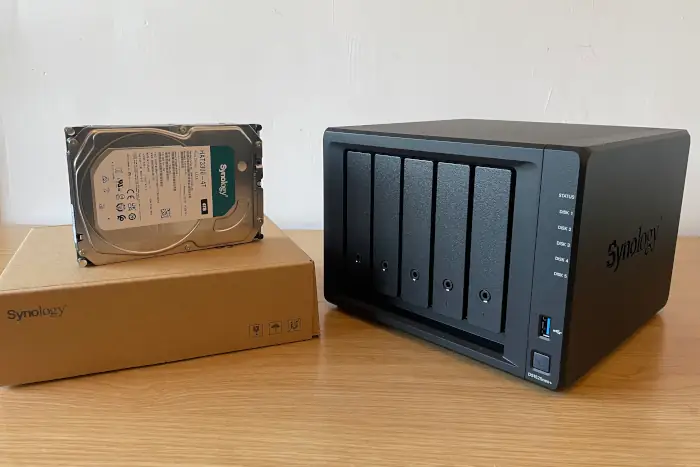
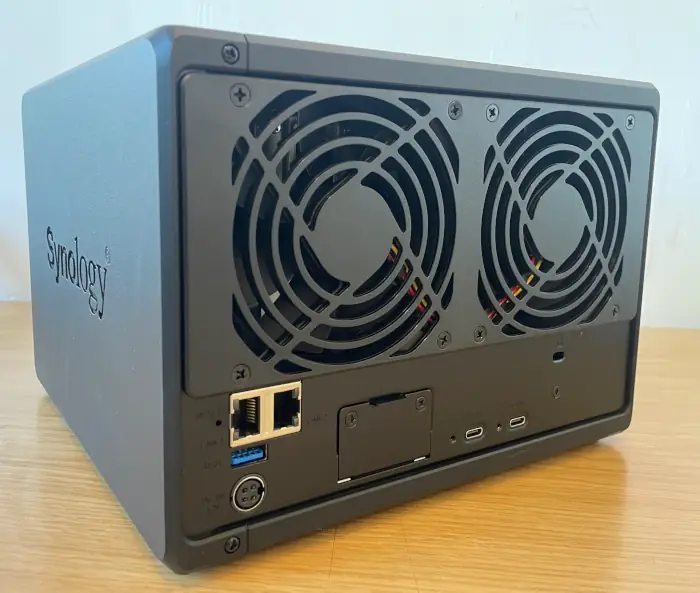
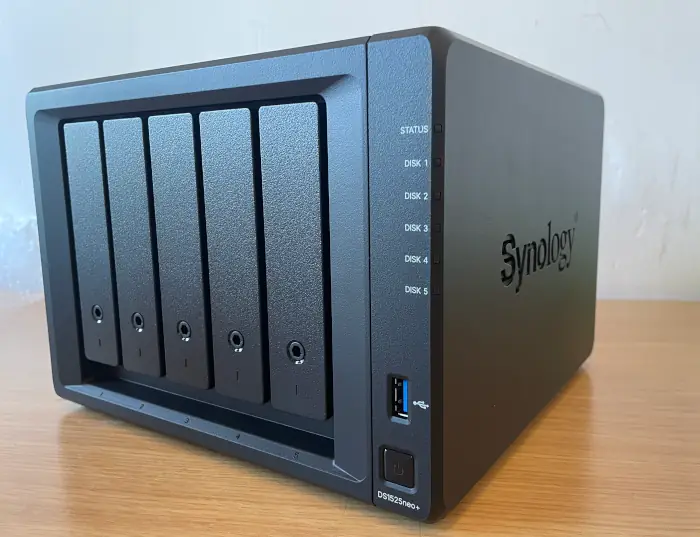
The DiskStation DS1525neo+ is a five-bay desktop NAS server designed to centralize data and digital services on a local network. Its form factor allows you to consolidate documents, photos, and backups on a single device, accessible from different computers and managed through DiskStation Manager (DSM). The appeal of this offering lies not only in the number of drives it can accommodate: the platform integrates collaboration, synchronization, data protection, and multimedia management tools that allow the NAS to be adapted to a wide range of needs.
According to Synology's official specifications, the DS1525neo+ features an AMD Ryzen V1500B quad-core, eight-thread processor clocked at 2.2 GHz, along with 4 GB of DDR4 SODIMM non-ECC memory pre-installed. This configuration is key to the neo+ family's positioning: offering a more accessible entry point to the DSM environment without sacrificing the manufacturer's core applications. Synology indicates a maximum memory capacity of 32 GB across two slots; it also supports upgrades with compatible ECC modules, although it does not officially support combining ECC and non-ECC memory in the same configuration.
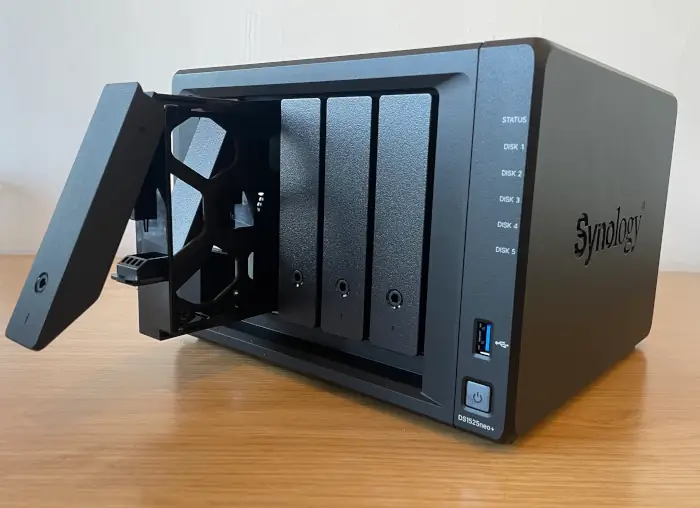
In terms of storage, the five bays support both 3.5-inch and 2.5-inch SATA drives. The device also includes two M.2 2280 slots for NVMe SSDs, allowing for caching configurations based on system requirements and compatibility. For installations that grow over time, Synology offers the option to expand the system to up to fifteen drives using compatible expansion modules. As with any NAS, the final usable capacity will depend on the installed drives and the chosen protection scheme, so the number of bays should not be confused with a fixed amount of available storage.
Standard connectivity includes two 2.5GbE RJ-45 Ethernet ports, suitable for integrating the NAS into modern networks without necessarily requiring an additional network card. The DS1525neo+ also offers a network upgrade option for scenarios requiring higher-speed connections, as well as USB 3.2 Gen 1 ports and expansion slots. These possibilities do not mean that all users need to upgrade their infrastructure from day one: for many advanced home environments and small offices, the starting point will be an existing local network and a well-designed backup policy.
The chassis measures approximately 166 × 230 × 223 mm and weighs 2.67 kg without installed drives, according to the manufacturer's manual. Front trays make it easy to identify the drive bays, while status indicators allow you to visually check drive activity and any issues. Beyond the hardware, the feature that defines everyday use is DSM: its interface is used to configure users, shared folders, file services, packages, and security mechanisms. For this reason, our evaluation focuses on real-world tasks performed from macOS, rather than a comparison of performance figures with other models.
Sources of the technical specifications in this section: product data sheet, official DS1525neo+ manual, and DiskStation neo+ series presentation published by Synology. The specifications describe capabilities declared by the manufacturer; our own usage tests begin in the following sections.
Test Approach:
The starting point for this review was deliberately practical. A five-bay NAS isn't just a box for installing drives; it's a piece of infrastructure that should facilitate data access, simplify routine tasks, and allow the user to recover information when something goes wrong. That's why we structured our review around a Mac, work files, and real photographs. We weren't trying to pin the device on a speed chart or artificially pit two product families against each other. The question was different: to what extent does the DS1525neo+ allow you to take advantage of the tools that make the Synology ecosystem recognizable?
It's important to clarify the scope of the evidence. When we talk about synchronization, version recovery, or protected links, we're referring to operations performed during our session. When we describe the expansion possibilities or the hardware, we also rely on technical information published by third parties and identify it as such. And when a function wasn't performed, such as a complete Mac backup using Active Backup for Business, we explicitly stated this. This separation allows the reader to distinguish between direct experience, advertised capabilities, and issues pending a longer test.
Rather than simply measuring isolated figures, this evaluation focuses on how the DS1525neo+ performs in an everyday Mac environment: setup, file management, synchronization, photo management, and the availability of backup tools. We haven't conducted a direct performance comparison with the traditional Plus models, as both ranges cater to different needs and budgets.
- DSM: The core of the
DSM experience consolidates tasks into a single web interface that, in other solutions, are typically spread across multiple programs. From the NAS desktop, you can access system status, shared folders, users, applications, and security options. This integration is particularly relevant for small businesses or freelancers: it doesn't require everyone to be an expert in network storage to get started. Administration still requires sound judgment—especially when deciding who can access each resource—but the system offers a coherent framework for managing those decisions.
During setup, we reviewed users, permissions, certificates, and options related to secure access. We also explored SMB parameters so that the Mac could work with the NAS resources in a familiar way. This experience illustrates a key advantage of Synology's approach: storage and applications don't operate in silos. A folder created for a project can serve as a file destination, a workspace, and a starting point for other services. Naturally, this convenience doesn't eliminate the need to keep DSM updated, protect accounts, and limit the NAS's internet exposure.
Setting up the device allowed us to access DiskStation Manager (DSM), configure the management environment, and familiarize ourselves with the system tools. The value of a NAS of this type lies not only in its drive bays: DSM provides a common platform for users, shared folders, permissions, services, and applications.
During the test, we also reviewed security settings, certificates, and file access options. These operations are relevant for small offices and advanced users looking to centralize their data without sacrificing a graphical management interface.
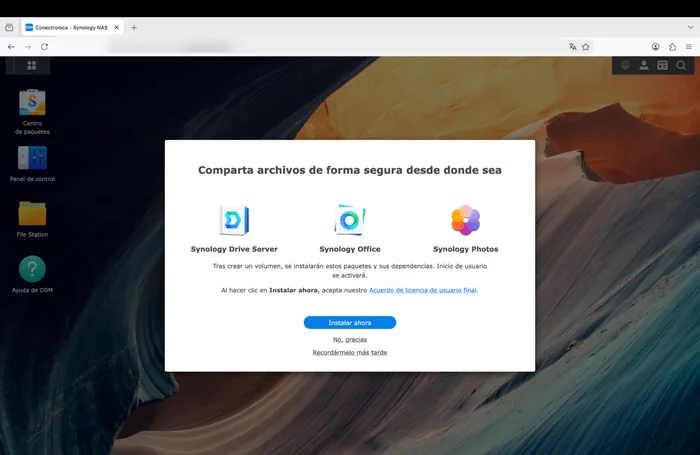
Figure 1. Initial DSM screen during the NAS startup process.
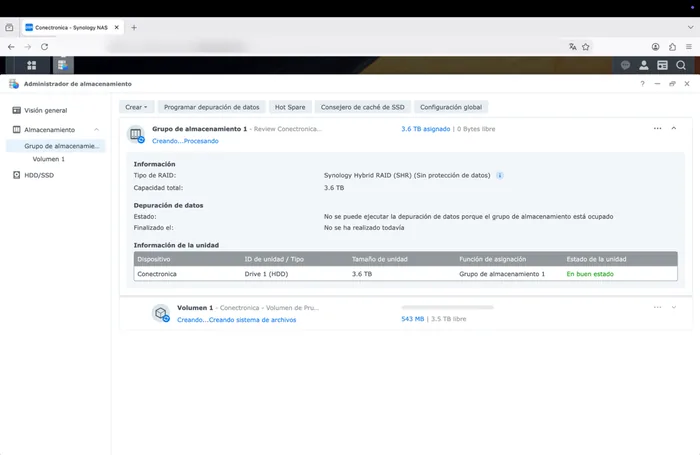
Figure 2. DSM interface with system status and management options.
2. Storage and Files from macOS.
Working with files was the first truly comprehensive test. We created folders, moved documents, checked their presence from different access points, and verified that permissions were applied to the expected content. The goal was to replicate an everyday scenario: a user stores documents on the NAS and needs to find, open, and organize them without constantly thinking about the physical location of each file. File Station offers a direct path from the browser, while access from macOS allows users to integrate shared storage into their regular workflow.
The test with a PDF of approximately 127.4 MB added an objective verification. After transferring it, we calculated its SHA-256 hash and compared the result between the source and destination. The match confirmed that, in that specific operation, the content arrived unaltered. This is an integrity test, not a benchmark: it's not useful for determining sustained speeds, latency under load, or performance with numerous simultaneous users. However, it does provide confidence in something fundamental for anyone storing professional documents: that a file can go through the transfer process and retain exactly its data.
A five-bay NAS also raises a planning question. It's not enough to consider the total capacity the disks support; you have to decide how much fault tolerance you need, how much space to reserve for growth, and how the volumes will be organized. RAID and Synology Hybrid RAID modes allow for different strategies, although the appropriate choice depends on the installed disks and the acceptable risk. It's important to remember that disk redundancy doesn't replace a backup: it protects against certain physical failures, but not against deletion, malicious encryption, or errors propagated by synchronization.
The evaluation included creating and managing folders, configuring permissions, and accessing files from macOS. Typical work operations were performed, such as copying, opening, organizing, and retrieving documents.
As an integrity check, we transferred a PDF file of approximately 127.4 MB and compared its SHA-256 hash. The result was identical in both the source and destination, confirming that the file used in this test was not modified during the transfer.
These verifications describe the performance observed in our environment. They do not equate to a sustained performance study nor do they allow extrapolating speeds to all configurations.
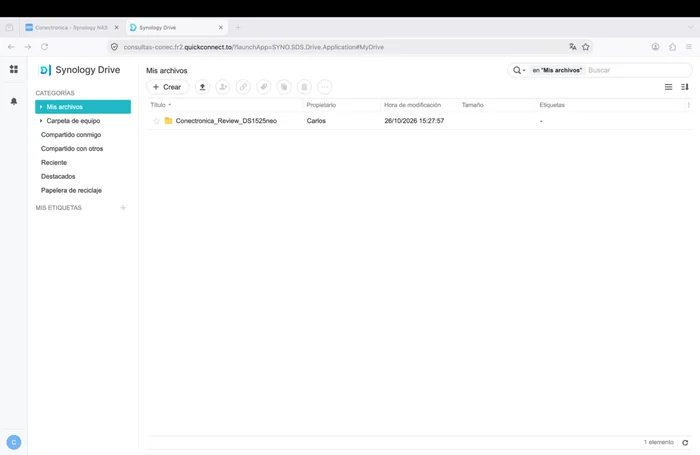
Figure 3. File Station: managing folders and files from DSM.
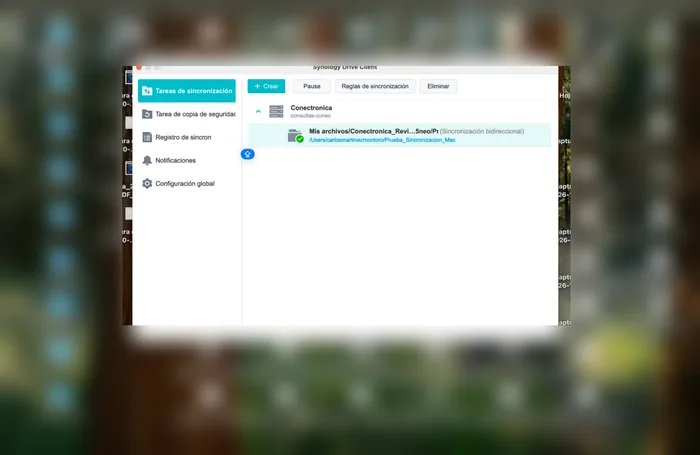
Figure 4. Working with files between the macOS desktop and NAS storage.
3. Synology Drive: A private work cloud.
Drive allows a work folder to be independent of a single computer. In our test, we established bidirectional synchronization between the Mac and the NAS: we created files on one end and verified that they appeared on the other. We repeated the operation in reverse to confirm that the workflow wasn't dependent on a single device as the source. The practical benefit is immediate for those who alternate between local work and a central repository: a working copy is maintained on the computer, and a common space is available from which to continue work.
Version history was another key feature. Synchronization doesn't necessarily mean complete protection: if a file is modified or deleted, that change can propagate. That's why the ability to recover a previous version is an important addition. During the test, we performed file and folder restoration operations and verified content recovery. The value lies not only in correcting a serious error; it also helps undo accidental changes, recover a draft, or return to a known state without manually reconstructing the document.
From a small office's perspective, Drive offers an alternative to relying solely on public cloud platforms. The NAS remains under the organization's management, and access policies can be tailored to each project. This doesn't automatically make a private cloud more secure: a backup strategy must be maintained, credentials managed, remote access reviewed, and recovery procedures established. In our case, the most compelling result was the seamless workflow between macOS and DSM, without turning synchronization into a permanent technical task for the user.
Synology Drive was one of the most comprehensive aspects of the evaluation. We set up bidirectional synchronization between the Mac and the NAS and verified changes originating from both ends: a file created on macOS appeared on the NAS, and another created on the NAS appeared on the Mac.
We also tested version history and file recovery, two features particularly useful in case of accidental modifications. The goal wasn't to repeat backup operations, but rather to verify that Drive can be integrated into a daily document workflow.
The combination of centralized access, synchronization, and versioning makes Drive a private cloud alternative for users who want to retain more control over where their files are stored.
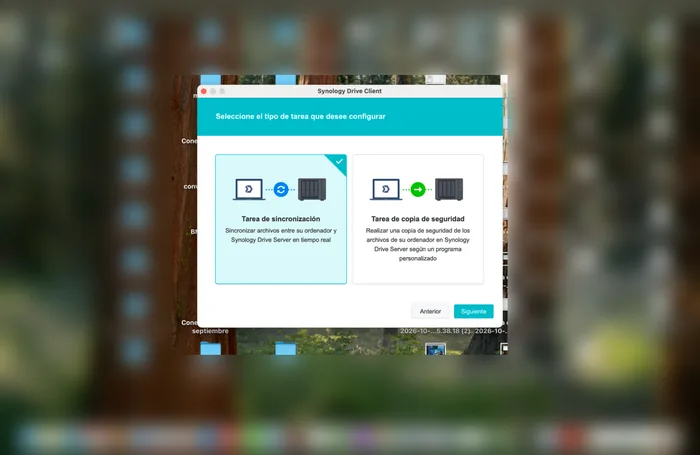
Figure 5. Synology Drive Client wizard during setup on macOS.
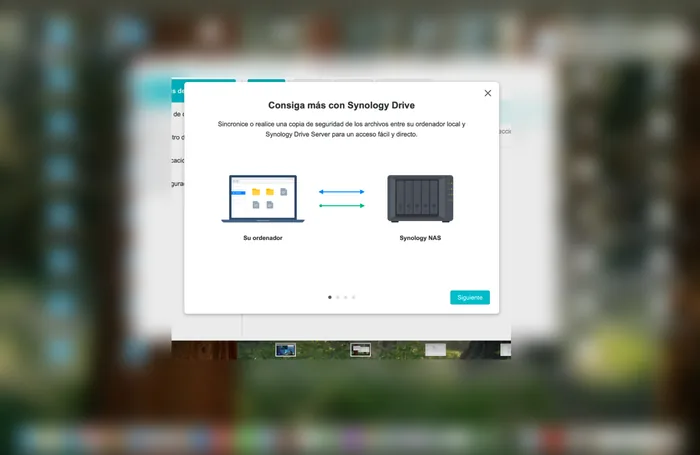
Figure 6. Synology Drive Client synchronization options.
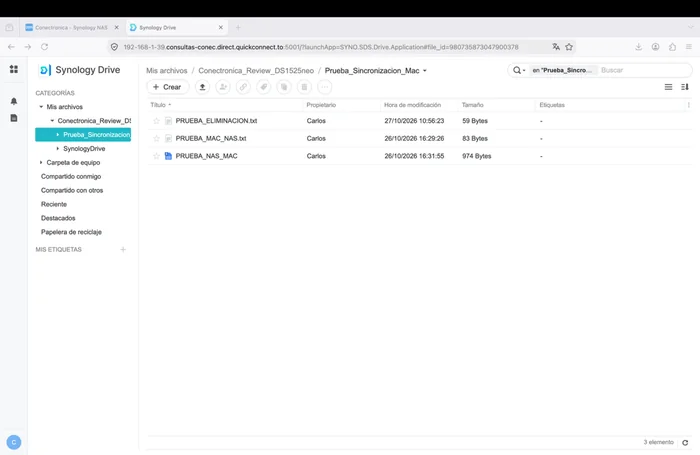
Figure 7. Management of synchronized files and change checks between Mac and NAS.
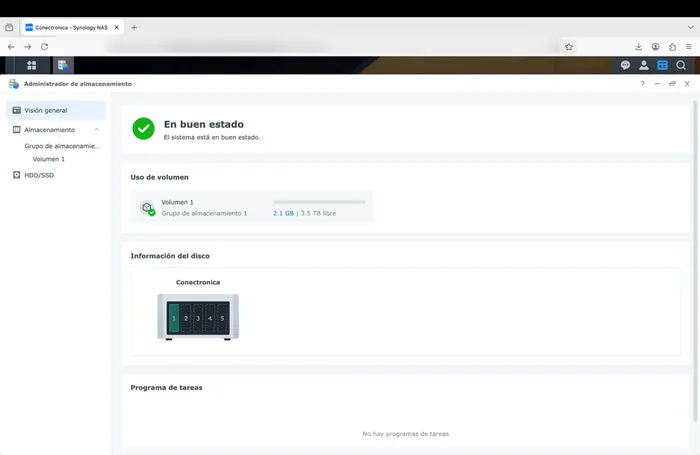
Figure 8. Synology Drive panel with synchronization information.
4. Synology Photos: Library, Albums, and Sharing.
Synology Photos covers a different scenario than Drive: organizing and accessing images without necessarily relying on a photo library hosted on an external service. We uploaded JPEG photos from our Mac and verified that they could be viewed in the library. Next, we created the album "Alcossebre Summer," added three photos, and tested navigating between them at full size. It's a simple process, but representative of what many families, freelancers, and small teams need: to gather visual material, organize it, and easily find it again.
Sharing the album allowed us to go a step further. We temporarily enabled a link, selected the viewing mode, and added a password. Then, we opened the link from a private browser window, without using the NAS administration session, and verified that it requested the password before displaying the images. Once inside, we didn't find a download button in the interface. This observation demonstrates that the display settings were reflected in the access experience, but do not equate to absolute protection against image copying, for example through screenshots.
At the end, we deactivated the test link. It's a small detail worth noting: temporarily publishing a folder or album can be useful, but it's best to close that access when it's no longer needed. Photos combines a relatively straightforward user experience with options that require administrative responsibility. In a professional setting, one would also need to consider preservation policies, obtaining permissions from the people photographed, and the advisability of separating personal and shared libraries. In our test, uploading, organizing, and secure access worked as expected.
The Synology Photos test consisted of uploading JPEG photos from the Mac, verifying their presence in the library, and organizing three images into an album called "Alcossebre Summer." We opened the photos full-size and navigated between them without incident.
We then temporarily enabled a shared link with a password and view permissions. From a private browser window, we verified that the password was requested before accessing the link and that a download button did not appear. At the end, we deactivated the link.
It's important to distinguish between preventing downloads through the interface and completely preventing a third party from saving an image: viewing never eliminates the possibility of taking screenshots. Even so, access controls and sharing options offer practical utility.
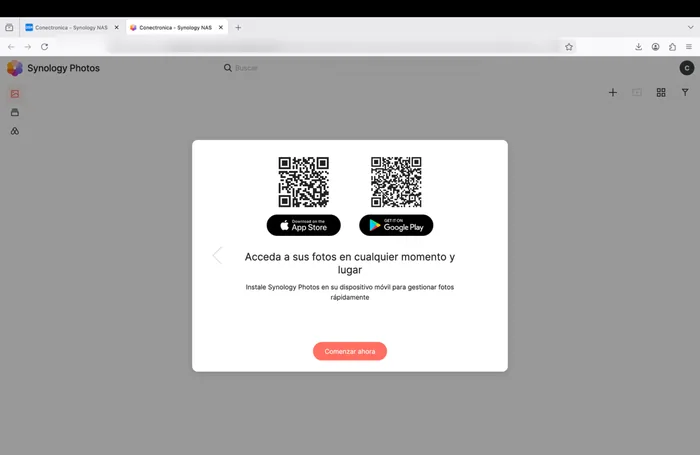
Figure 9. Synology Photos welcome screen before starting to use the library.
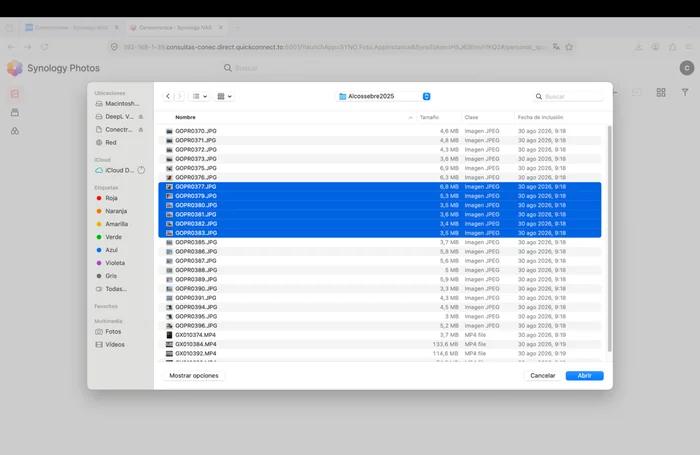
Figure 10. Selection of JPEG photos from the Mac to upload to Synology Photos.
5. Active Backup for Business represents a leap from file storage and synchronization to a comprehensive device protection strategy. Its dashboard distinguishes between PCs and Macs, physical servers, file servers, virtual machines, and other Synology NAS devices, in addition to offering specific sections for monitoring storage, activity, and the status of restore tasks. This breadth makes the tool a particularly attractive solution for small businesses and professional environments that need to centralize the protection of various devices without relying on multiple applications.
On our DS1525neo+, we located the package in the Package Center, completed its installation, and performed the initial activation without incident. The console opened correctly and allowed us to explore the different configuration options. Next, we downloaded the macOS agent to test its functionality on our test machine, a Mac equipped with an Apple M3 processor.
Installing the agent required paying close attention to macOS security mechanisms. Following Synology's instructions, we granted full disk access permissions and completed the necessary steps to authorize the system components used by the application. After applying the corresponding settings and restarting the computer when required, the agent was successfully installed and established communication with the NAS. The Mac appeared in the Active Backup for Business console as a device available for protection.
With the computer registered, we proceeded to create our first backup job. From the administration interface, we selected the Mac as the source, set the storage destination to the NAS, and configured the protection and versioning options. The wizard allowed us to complete the process in an orderly fashion, with a layout of options that makes it easy to understand which devices are being protected and under what conditions.
The first backup executed successfully. During the process, we were able to monitor its progress from the console, check the job status, and verify that the system was correctly logging the activity. Once completed, Active Backup for Business confirmed the execution and made the corresponding recovery point available. The integration between the macOS agent and the DS1525neo+ functioned stably throughout the entire operation, without interruptions or errors that compromised the result.
We also tested the behavior of subsequent backups. After modifying and adding various files on the Mac, we ran a new task to verify the operation of the incremental backup mechanism. The system completed the operation successfully and allowed us to preserve different states of the protected data. This capability is especially useful in work environments where documents change frequently and it is important to have previous versions available without having to manually manage each backup.
Another aspect we evaluated was the automatic scheduling. We configured a periodic schedule and verified that the tasks started according to the established parameters, and were recorded in the activity history. In this way, the system allows for continuous protection with minimal user intervention. The retention options also make it easy to organize recovery points and adapt backup retention to the needs of each installation.
The most important test came with the restoration process. To verify that the stored data could be recovered correctly, we used Active Backup for Business's recovery tools and selected one of the restore points generated during testing. We located several files and folders, initiated their recovery, and subsequently verified that the restored items retained their content and could be opened normally.
The result was satisfactory and confirmed the functionality of the entire file protection and recovery process. This verification is crucial, as a backup solution should not be evaluated solely on its ability to generate copies, but also on the reliability and ease with which it allows data recovery in the event of an incident.
The conceptual difference compared to Synology Drive was also clearly reflected during testing. While Drive is geared towards keeping files synchronized and available across different devices, Active Backup for Business offers a protection strategy based on scheduled tasks, execution history, and recovery points. Both services can coexist perfectly on the same NAS and meet complementary needs: Drive facilitates daily work and Active Backup for Business provides an additional layer of security against data loss, accidental modifications or equipment problems.
In terms of user experience, the assessment was very positive. Although installing the agent on macOS requires addressing certain permissions and security settings, the procedure was completed by following the instructions. Once configured, daily operation was straightforward, with a centralized console from which we could monitor tasks, view their history, and access recovery options.
Active Backup for Business successfully passed our test scenario with the DS1525neo+ and the Mac with an Apple M3 chip. We completed the installation and activation of the package, configured the macOS agent, registered the device, ran backups, tested the functionality of incremental and scheduled tasks, and performed a controlled file recovery with successful results.
The experience demonstrated the NAS's potential as a centralized data protection platform. For a small business or professional looking to complement file synchronization with a backup policy, Active Backup for Business provides management, automation, and recovery tools that significantly expand the system's capabilities.
6. Positioning of the neo+ Series
The DS1525neo+ is positioned within a family designed to lower the entry price. It's a five-bay system with an AMD Ryzen V1500B processor, two 2.5 GbE network connections, two M.2 slots, and network and storage expansion options.
The DS1525neo+ comes standard with 4 GB of DDR4 non-ECC memory, compared to the 8 GB of ECC memory found in its Plus series counterpart, according to the source consulted. ECC memory incorporates mechanisms for detecting and correcting certain memory errors, a relevant feature in scenarios that prioritize integrity and continuity. While the non-ECC memory contributes to a different price point, it doesn't, in itself, make the system unsuitable for professional work. The choice should be based on the intended use, availability requirements, and support policy.
The device allows for RAM upgrades and compatibility with third-party modules. Similarly, the SATA bays, NVMe slots, and multi-gigabit connectivity offer room for future growth, but their effectiveness depends on the configuration, drives, network, and applications actually used.
The buyer gets an expandable NAS with DSM, file services, synchronization, photography, and data protection tools. In our daily use, this software continuity is more important than any single spec sheet. For those who require specific memory guarantees or anticipate particularly demanding workloads, the choice may be different. For those who prioritize centralizing their data and deploying common services, the balance between platform and budget is the main consideration.
The DS1525neo+ is best understood as a more accessible entry point to the Synology ecosystem rather than a direct competitor to the Plus models in speed tests. It retains the DSM platform and access to applications that cover real-world uses: file sharing, private cloud, photos, and data protection.
One product distinction worth noting is the non-ECC memory of the neo+ series, compared to the ECC memory and higher memory capacity of the corresponding Plus models. The choice between product lines should be based on reliability, expandability, workload, and budget, not a simplistic ranking by speed.
7. Verdict
The most interesting aspect of the experience is that the DS1525neo+ doesn't force you to choose between storing and using data. DSM functions as a common platform upon which different tasks are built: a shared folder for documents, Drive for keeping work synchronized, and Photos for organizing images. There is a learning curve, especially when permissions or remote access come into play, but the applications share a recognizable management language. For a user new to the NAS world, this consistency can be as important as the number of drive bays.
There are also clear limitations. This evaluation does not include a prolonged reliability campaign, a security audit, intensive multi-user testing, or comparable measurements of power consumption, noise, or performance. Active Backup for Business was validated during both installation and activation, as well as during recovery operations. The results were very favorable in all practical scenarios tested, with Drive and Photos performing particularly well.
After testing, the DS1525neo+'s main strength is its overall consistency. DSM allows users to start with shared storage and expand the NAS's functionality to include services like Synology Drive and Photos without switching platforms.
Drive stood out for its everyday usefulness in file synchronization and recovery; Photos, for the ease of organizing and sharing a personal library. Active Backup for Business adds an extra layer of protection capabilities.
For those looking to centralize information and have a private cloud with integrated tools, the DS1525neo+ presents a very compelling proposition within its market position. Before making a decision, it's advisable to assess memory requirements and anticipated workloads, especially if future expansion needs are expected.
Scope and transparency of the test:
Results based on the documented hands-on session with screenshots from DSM and macOS. The selected images illustrate the operations performed and should not be interpreted as performance results.
Official sources for the equipment description: Synology, "DS1525neo+ Product Manual"; Synology, "DiskStation neo+ Series"; Synology, DS1525neo+ Product Sheet. Accessed October 2026.