.jpg)
Some examples include: recovering thousands of deleted emails, conducting an investigation after an employee is fired, recovering digital evidence after formatting a hard drive, and conducting an investigation after multiple users have taken control of the system.
Operating systems are becoming increasingly complex in terms of lines of code and the number of files they use. For example, a superficial examination of files can prevent the detection of filenames that may have been maliciously added. The Windows file CMS32.dll (Console Messaging Subsystem Library) is legitimate, but wow32.dll (32-bit wow subsystem library) is malicious; the file kernel32.dll is legitimate, but kerne132.dll is malicious.
Characterization of Computer Forensics. Incident Response.
There are several definitions of computer forensics: (1) The process of identifying, preserving, analyzing, and presenting digital evidence in a manner that is legally acceptable in any judicial or administrative proceeding. That is, it recovers data using the rules of evidence. (2) It involves obtaining and analyzing digital information to obtain evidence in administrative, civil, or criminal cases. (3) It involves scientifically examining and analyzing data from computer storage media so that such data can be used as digital evidence in court. (4) Application of the scientific method to digital storage media to establish fact-based information for judicial review. (5) This involves preserving, identifying, extracting, documenting, and interpreting computer storage media in search of evidence and/or root cause analysis. Various methods are used, such as: (i) Discovering data on a computer system. (ii) Recovering information from deleted, encrypted, or damaged files. (iii) Monitoring past activity. (iv) Detecting violations of corporate policy. The information gathered allows for arrest, prosecution, termination of employment, and prevention of future illegal activity. Digital evidence is any information, whether or not subject to human intervention, that can be extracted from a computer, is in a human-readable format, and can be interpreted by someone with expertise in the subject matter. Examples of computer forensics applications include: recovering thousands of deleted emails, conducting investigations after terminating an employee, recovering evidence after formatting a hard drive, and conducting investigations after multiple users have taken control of a computer. (6) The use of specialized techniques to recover, authenticate, and analyze electronic data when a case involves issues related to reconstructing computer usage, examining residual data, authenticating data for technical analysis, or explaining technical characteristics of data and computer usage. Computer forensics requires specialized experts who go beyond normal data collection and preservation techniques available to end users or system support personnel. Incident response pursues the following objectives: identifying, designating, or securing evidence; reviewing any existing logs of what has already been done on the system and/or how the intrusion was detected; starting a new log or maintaining the existing one; installing monitoring tools (sniffers, port scanners); without restarting the system or affecting running processes, making a copy of the physical disk; capturing network information; capturing processes and files in use (DLLs, EXEs, etc.); capturing configuration information; and collecting and signing data.
 Reasons for Antiforensics. Foundations.
Computer antiforensics is the application of scientific methods to digital storage media to invalidate fact-based information for use in legal proceedings. Antiforensics software limits and/or modifies evidence that a forensic investigator could collect after an incident. It allows for the concealment or distortion of digital evidence data and exploits the limitations of known and used forensic tools. It operates on various operating systems, including Windows, Linux, and Unix. It is installed on the computer before or after its acquisition.
The reasons for using computer antiforensics are diverse. It can be used to: (1) Validate forensic tools and techniques. It can improve processes such as Justice Data Processing Facility (JDFP). (2) Exonerate a guilty party who deletes or modifies data to avoid being dismissed from their job or facing legal proceedings. (3) Frame an innocent party by introducing false data.
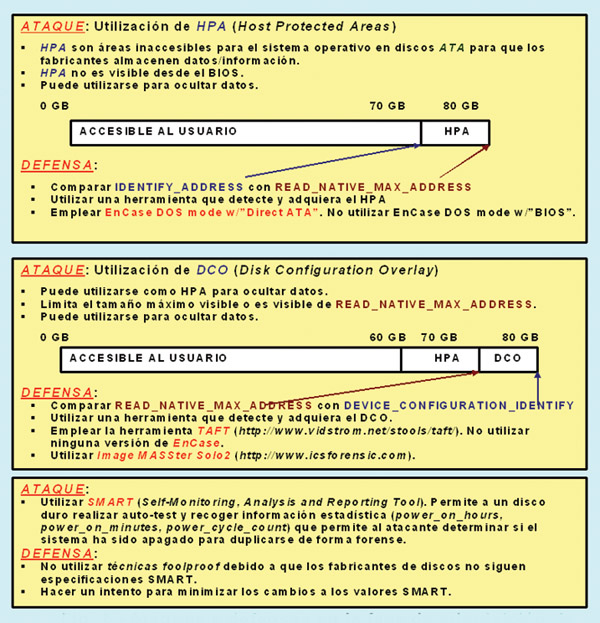
The foundations of computer antiforensics (AF) are: (a) Assumptions. Data is evidence; we trust our tools and our analysts will find everything. (b) Process. Understand the process better than skilled technicians. Theorize about weaknesses. Test the theory. (c) Attack. Three areas can be distinguished: (i) Attacking the data. Use techniques of contraception, concealment, very low-level destruction, manipulation, and fabrication. (ii) Attacking the tools. Find gaps in the coverage of the tools, use tricks to falsify the analysis of the tools. (iii) Attacking the analysts. Information is power, and attackers leak knowledge. Attackers only need one place to hide; analysts have to check every place.
 Computer forensics: What it can reveal. Where to look for evidence.
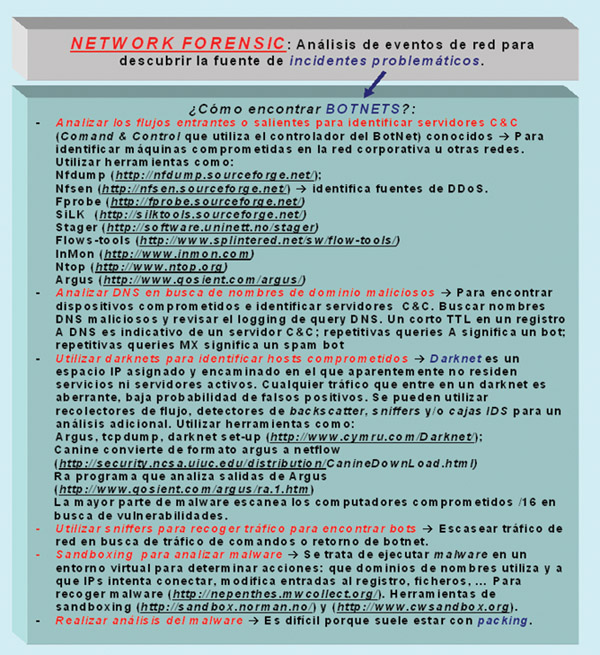
A computer hacking forensics investigation is the process of detecting hacking attacks and properly extracting evidence to report the potential crime and conduct audits to prevent future attacks. Computer forensics is the application of computer analysis and investigation techniques to determine potential legal digital evidence. Computer forensics can reveal: (1) How the intruder entered the corporate network. (2) It shows the path. (3) It reveals the intrusion techniques. (4) It allows for the collection of digital traces and evidence. A forensic investigator cannot solve the case alone or predict what they suspect; they will only be limited to providing hypotheses.
Evidence can be sought on: (i) Computers in the environment, in the form of logs, files, environmental data, and tools. (ii) Firewalls, in the form of logs, whether they are the victim of the attack or an intermediary for the victim. (iii) Network interconnection devices (such as switches, bridges, routers, etc.), in the form of logs and buffers. (iv) Victim's computer, in the form of logs, files, environmental data, altered configuration files, remnant Trojan files, files with mismatched hashes, Trojans, viruses, worms, stored stolen files, altered web remnants, etc.
Ways to hide files: (a) Use the operating system itself, for example, Windows, to hide files. (b) Make the text the same color as the screen background. (c) Change the file extension, for example, from .doc to .xls. (d) Erase disks and use a recovery utility. (e) Use steganography. (f) Empty the recycle bin. Some resources for forensic security: (1) The Coroner's Toolkit (free) http://www.porcupine.org/forensics/tct.htm.
(2) TASK Tool (free) http://atstake.com/research/tools/task. (3) EnCase Tool (commercial) http://www.guidancesoftware.com. (4) DriveSpy Tool (commercial) http://www.digitalintel.com.
 Forensic Security in Business. Who Uses Forensic Security? Phases of Forensic Security.
There is a growing and highly relevant field of applications within the information security knowledge area called computer forensics. For example, in the business world, it is used to identify and track: theft/destruction of intellectual property, unauthorized activity, internet browsing habits, event reconstruction, inferring intentions, selling company bandwidth, software piracy, sexual harassment, and wrongful termination claims.
Forensic security is used by an increasing number of people, including: (1) Law enforcement officers. It is based on evidence obtained from computers and networks that the investigator suspects and uses as evidence. (2) Civil and administrative litigation. Business and personal data discovered on a computer can be used in cases of harassment, discrimination, divorce, fraud, etc., or to improve security. (3) Insurance companies. Digital evidence discovered on computers can be used to offset costs (fraud, workers' compensation, arson, etc.). (4) Private corporations. Evidence obtained from employee computers can be used as evidence in cases of harassment, fraud, and embezzlement. (5) Law enforcement agencies. It is used to support search warrants and post-seizure investigations. (6) Private citizens/individuals. They obtain the services of professional forensic specialists to support claims of harassment, abuse, wrongful termination of employment, etc., or to improve security.
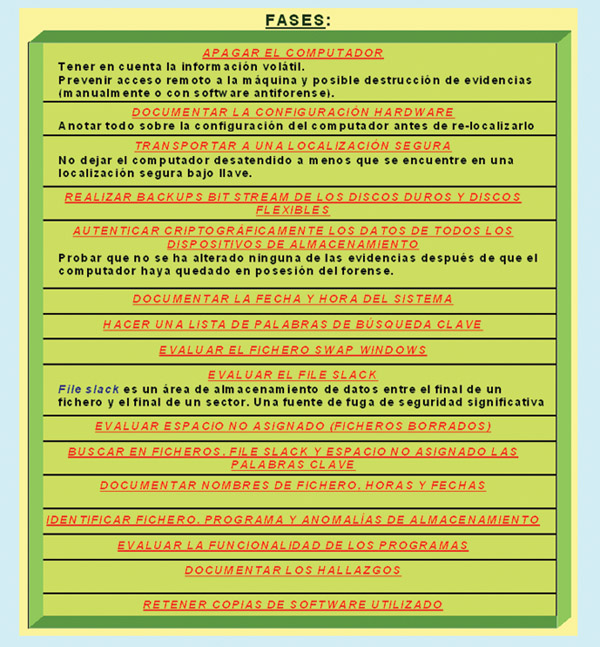
The phases of computer forensics are: (1) Acquisition or collection of evidence. This involves obtaining physical or remote possession of the computer, all network correspondence from the system, and external physical storage devices. It includes evidence authentication, chain of custody, documentation, and preservation. (2) Data identification and analysis. Identifying which data can be recovered and retrieving it electronically by running various computer forensics tools and software suites. Automated analysis is performed using these tools. Manual analysis is carried out by experienced and trained personnel. (3) Evaluation. Evaluating the recovered information/data to determine whether and how it can be used against the suspect, with a view to dismissing the employee or bringing them to trial. (4) Presentation of findings. Presenting the discovered evidence in a way that is understandable to lawyers and non-technical personnel. This can be an oral or written presentation. Some weaknesses of the forensic process are: (1) In the data collection phase. If an incomplete chain of custody or data collection is identified. (2) In the data analysis phase. If an inappropriate methodology, training, or tools are used. (3) In the findings presentation phase. If it is easy to sow doubt about the presented findings. Therefore, it is a matter of acting and exploiting vulnerabilities in all three areas.
 Challenges of Security Forensics. Evidence Management.
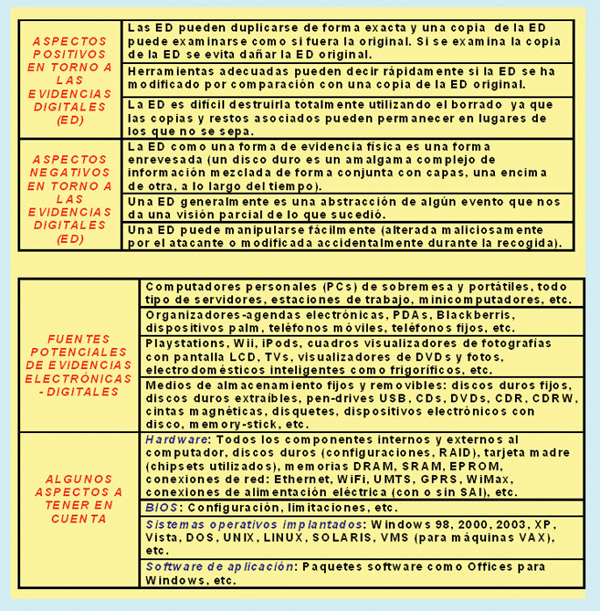
The information and data sought after an incident and collected during the investigation must be handled appropriately. This can be: (1) Volatile information. This includes: (i) Network information. Communication between the system and the network. (ii) Active processes. Programs currently running on the system. (iii) Logged-in users. Users and employees currently using the system. (iv) Open files. Libraries in use, hidden files, Trojans/rootkits loaded onto the system. (2) Non-volatile information. This includes information, configuration data, system files, and registry data that are available after a system reboot.
This information is researched and reviewed using a backup copy. The fixed hard drives may be SATA drives with a speed of 5400 rpm and a capacity of 320 GB; the removable drives may be Seagate drives with a capacity of 140 GB and a speed of 15K rpm with a SCSI connection.
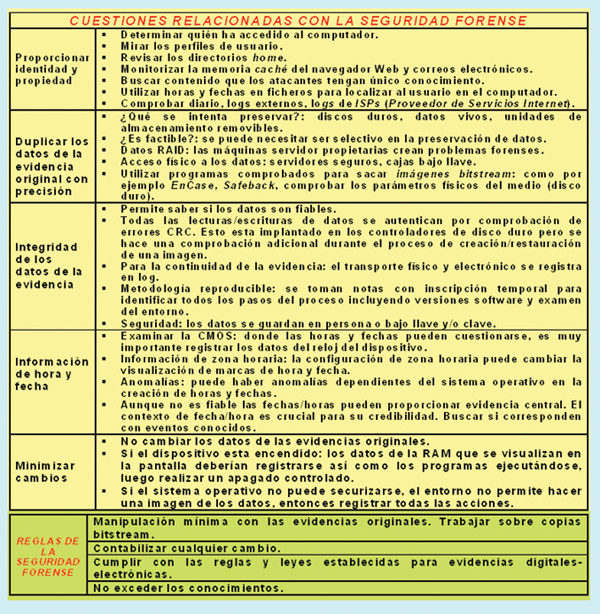
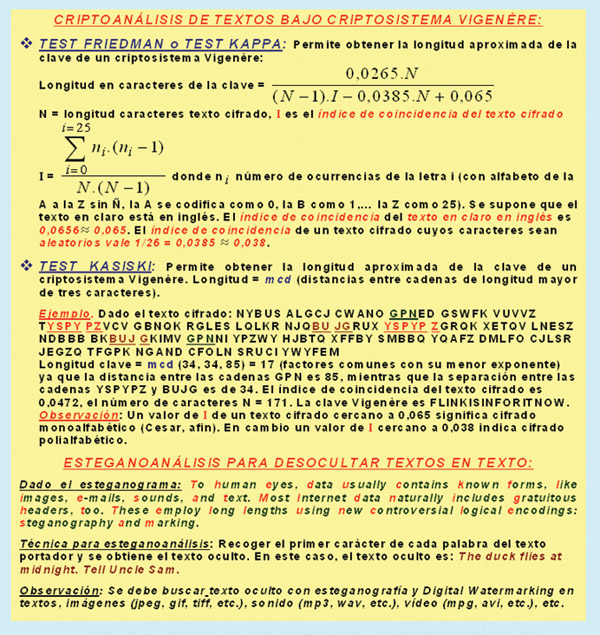 Evidence management shares the same objectives as forensic security, namely: (a) Admissibility of evidence. Legal rules determine whether potential evidence can be considered in court. Evidence must be obtained in a manner that ensures its authenticity and validity, and no alterations should be made. (b) Computer search procedures must not damage, destroy, or compromise evidence. (c) Prevent the introduction of viruses into the computer during the analysis process. (d) Protect extracted/disclosed evidence from potential mechanical or electromagnetic damage. (e) Establish and maintain a continuous chain of custody. (f) Limit the number of times business operations are affected. (g) Do not disclose and respect any client information (from an ethical and legal standpoint) that may have been inadvertently acquired during a forensic examination.
  Final Considerations
Our research group has been working for over fifteen years in the field of forensic security and related areas such as counter-forensics, evidence management, and incident response. We have evaluated hardware and software network deployments. The connection between forensic security and penetration testing for improving an organization's security is clear.
This article is part of the activities developed within the LEFIS-APTICE (funded by Socrates 2005-2007. European Commission).
Literature
- Areitio, J. “Robust Integration Between Incident Management and Information Security Forensics.” Conectrónica Magazine. No. 103. January 2007.
- Areitio, J. “Analysis of Technologies for Information Concealment.” Conectrónica Magazine. No. 109. July 2007.
- Areitio, J. “Identification and Analysis of Intrusion Detection and Prevention Systems.” Conectrónica Magazine. No. 112. November 2007.
- Areitio, J. “Information Security: Networks, Computing, and Information Systems.” Cengage Learning Paraninfo. 2008.
- Kruse, WG and Heiser, JG “Computer Forensics: Incident Response Essentials.” Addison Wesley. 2009.
- Carr, H., Snyder, C. and Bailey, B. “Management of Network Security”. Prentice-Hall. 2008.
- NcNab, C. “Network Security Assessment”. O'Reilly. 2007.
- Foreman, P. “Vulnerability Management”. Auerbach Publications. 2009.
- Hoopes, J. “Virtualization for Security: Including Sandboxing, Disaster Recovery, High Availability, Forensic Analysis and Honeypotting.” Syngress. 2008.
- Mandia, K. and Prosise, C. “Incident Response and Computer Forensics”. 2nd Edition. McGraw-Hill. 2003.
- Jones, KJ, Bejtlich, R. and Rose, CW “Real Digital Forensics: Computer Security and Incident Response”. Addison-Wesley. 2005.
- Carrier, B. “File System Forensics Analysis”. Addison-Wesley. 2005.
- Jones, R. “Internet Forensics”. O'Reilly Media, Inc. 2005.
- Casey, E. “Digital Evidence and Computer Crime.” Academic Press. 2nd Edition. 2004.
- Solomon, M., Barrett, D. and Broom, N. “Computer Forensics JumpStart”. John Wiley and Sons. 2004.
- Malin, CH, Casey, E. and Aguilina, JM “Malware Forensics: Investigating and Analyzing Malicious Code”. Syngress. 2008.
- Srihari, SN and Franke, K. “Computational Forensics”. Springer. 2008.
- Newman, RC “Computer Forensics: Evidence, Collection and Management”. Auerbach Publications. 1st Edition. 2007.
- Singh, A. “Vulnerability Analysis and Defense for the Internet”. Springer. 2007.
- Sammes, AJ and Jenkinson, B. “Forensic Computing”. Springer. 2007.
- Dowd, M., McDonald, J. and Schuh, J. “The Art of Software Security Assessment: Identifying and Preventing Software Vulnerabilities”. Addison-Wesley. 2006.
- Buchanan, WJ “Introduction to Network Forensics”. Auerbach Publications. 2009.
- Lee, W., Wang, C. and Dagon, D. “Botnet Detection: Countering the Largest Security Threat”. Springer. 2007.
Author:
Prof. Dr. Javier Areitio Bertolín.
Professor at the Faculty of Engineering, ESIDE.
Director of the Networks and Systems Research Group, University of Deusto.