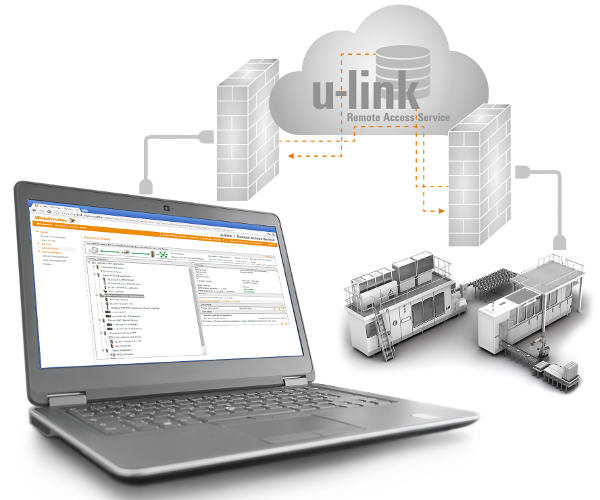
Weidmüller offers various licensing options for its u-link software solutions. In addition to the basic version, there are Standard 150, Standard 300, Standard 500, and Standard Unlimited options. All u-link remote access versions include a web portal service that allows service PCs to easily and securely access Ethernet devices located on a remote network. The service provided by Weidmüller (VPN server) and its industrial security router on the target network enable remote VPN access via PCs. The u-link VPN server acts as a central hub, connecting a service PC (VPN client) to a router on the target network to access Ethernet devices connected to that router. This central hub allows for establishing an outbound VPN connection at any time, both from the remote access point (service PC) and from the router, which is commonly permitted and compliant with IT security requirements.
Each u-link customer account uses separate database and server instances to keep clients isolated and secure. Data communication between the u-link VPN server and remote clients (routers and service PCs) is conducted over a certificate-protected OpenVPN connection (RSA 2048 encryption, X.509 certificates).
Weidmüller offers several versions for its u-link remote access service, each with different features: Basic, Standard 150, Standard 300, Standard 500 and Standard Unlimited.
The Basic version is free and has no validity period restrictions. However, the maximum number of routers (access points to a remote network) is 50. On the other hand, the number of users is unlimited. It allows the use of two simultaneous transit VPN connections (service PCs can access a router or network through the u-link VPN server). The Basic version offers a maximum monthly bandwidth of <= 1 GB at 500 kbit/s and > 1 GB at 64 kbit/s per VPN channel, which is not guaranteed.
The Standard 150 version allows you to configure up to 150 routers. It supports a maximum of three simultaneous VPN connections, with the option to purchase additional simultaneous VPN connections. This version enables realistic configuration of device topology in a clearly structured tree diagram. It also allows you to organize service users into groups. Access rights assignment is precisely tailored to the device topology. Furthermore, this version includes an advanced reporting and statistics function. Regarding bandwidth, it offers a guaranteed maximum of 1 Mbps per VPN channel with a monthly data limit of 5 GB, while for consumption exceeding 12 GB/month, the maximum is 500 kbps. It allows you to purchase additional simultaneous VPN channels, each with a monthly data limit of 1 GB and a bandwidth of 1 Mbps. System availability is ≥ 99.6%.
The Standard 300, Standard 500, and Unlimited Standard versions allow you to configure a maximum of 300, 500, and an unlimited number of routers, respectively. All other features and terms of use are the same as those offered with the Standard 150 version. To upgrade from one version to a higher one—e.g., from Standard 150 to Standard 300—the user simply needs to activate their key after purchasing the corresponding license. Regarding the upgrade to include "additional simultaneous VPN connections," the license is applicable to all Standard versions, with a data limit of 1 GB/month and a bandwidth of 1 Mbps.
Users and administrators can easily upgrade from the free Basic version to a Standard version of u-link. Existing customer accounts are automatically updated to the new version simply by entering the license code in the u-link portal. The new features become available automatically upon entering a valid license key (activation code). This key is valid for one year. Its expiration date is indicated under "User License Validity." If a user enters a valid key before their Standard license expires, the remaining validity period is extended by one year.
The same applies to the "additional VPN connections" option. If you have one of the Standard versions, you can add additional simultaneous VPN connections to the three VPN connections included in your license. The u-link customer manager establishes an additional connection by entering the license key (the activation code for a one-year validity period). The VPN license key can also be used to extend an additional VPN connection (for a period of one year).