It features a wide base with angled points and six high-gain antennas in a 3T3R MIMO configuration, ensuring excellent connectivity from anywhere in your home. It also includes four Gigabit Ethernet WAN/LAN ports for high-speed wired connections and a USB 3.0 port for streaming content from hard drives or USB flash drives via the free mydlink Shareport app or DLNA.
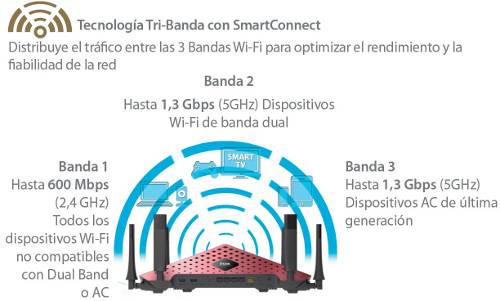
This router boasts two 5GHz bands (up to 1300 Mbps each) and one 2.4GHz band (600 Mbps), delivering maximum speed to every device connected to the wireless network thanks to SmartConnect technology. This technology distributes traffic across these three bands from a single SSID, although the router can also be configured to generate three SSIDs, one for each band. Furthermore, its 1GHz dual-core processor provides exceptional performance, and it incorporates hardware NAT to maximize the performance of LAN-WAN and WAN-LAN connections on both your local network and the internet.
Meanwhile, Advanced AC SmartBeam™ technology directs the wireless signal toward client devices to optimize both performance and coverage, while Band Steering technology forces devices that support the 5 GHz band to connect to it. Airtime Fairness optimizes the wireless network when multiple client devices with different standards connect, preventing, for example, the performance of a 1300 Mbps wireless network from dropping drastically when 150 Mbps client devices connect.
The DLNA server transforms this router into a media server, allowing you to stream Full HD files or movies stored on a hard drive or USB flash drive connected to the DIR-890L's USB 3.0 port, or from any computer or NAS on your local network. The Advanced Quality of Service (QoS) feature lets you prioritize network traffic for specific devices or applications, so gamers can prioritize their game console, or, if playing on a PC, prioritize games for online multiplayer.
The DIR-890L is compatible with the mydlink platform, allowing users to remotely manage the router from a PC/Mac by accessing the mydlink portal through any browser, or from an iPhone/iPad/Android/Windows Phone using the free mydlink lite app. Among its many remote management options, the ability to view connected devices, check the browsing history of each device, and block devices stands out, providing effective parental control. Additionally, the router can be restarted if a problem arises, or an email notification can be scheduled to be sent whenever a device connects or if intrusion attempts are detected. Another free app compatible with the DIR-890L is mydlink SharePort. This app transforms any USB storage device connected to the DIR-890L's USB port into a private cloud storage accessible from anywhere using iOS/Android smartphones or tablets. Through an intuitive touch interface that categorizes files, you can access documents, download them, share them on social media, stream multimedia files, and, even more importantly, upload any type of file to the storage device connected to the router's USB port to free up space on your mobile device. All of this can be done both over a local Wi-Fi connection and remotely, as long as your smartphone or tablet has an internet connection.