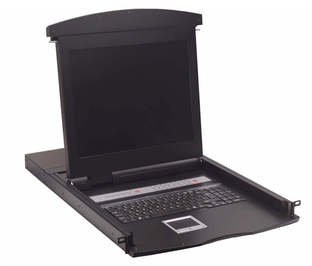
Its classification is determined by the number of CPUs to be controlled and how far to expand control; whether remote access via IP is required; whether concurrent users in different sessions are required through the KVM console or without it; and the distance of the CPU from the KVM switch.
KVM consoles can be used anywhere that requires remote multi-user access to a set of CPUs and where space for equipment installation is limited. This means that potential customers for this solution range from any office needing to control more than two CPUs to any organization aiming to optimize space: government, healthcare, education, finance—anywhere a set of CPUs is connected in a single location, such as a data center, small server room, or DVR.
Cost-benefit analysis of KVM switches:
One benefit of a KVM console is the savings in hardware investment. There's no longer a need to purchase a keyboard, monitor, and mouse for each CPU you want to manage, saving on accessories and, especially, on rack space in the server room.
A KVM switch offers advantages such as emulation for controlling each CPU, allowing them to detect that they have their own keyboard, monitor, and mouse. Furthermore, operating system information is not shared, and "plug and play" reconfiguration is avoided each time you select to control specific CPUs with the KVM.
A desktop KVM can control from 2 to a maximum of 4 CPUs at a distance of no more than 7 meters, with a lower investment. On the other hand, a standard KVM can control from 8 CPUs and expand its control to 512 CPUs using a daisy chain configuration.
Some KVM switches support distances from the CPU between 30 and 50 meters, depending on the model. Category 5 UTP cabling is used; therefore, the distance determines the KVM model the administrator needs. Some KVM switches include remote IP access, allowing the site to be controlled from another location as if the administrator were physically present at the CPU. Users can also access BIOS screens to reconfigure hardware components, install operating systems, or access network services not available at the CPU.
For more information or a quote,