When an organization deploys a web application (for example, on a Tomcat web server interacting via JDBC with an SQL database server), it invites everyone to send it HTTP/HTTPS requests. Attacks hidden within these requests can bypass conventional security measures such as firewalls, filters, IPSs, AVs, etc. The code of each web application becomes part of the security perimeter. Therefore, the number, size, and complexity of web applications increase the exposure of an organization's security perimeter. Websites can embed content from many sources, such as frames, scripts, CSS, objects (Flash), etc. The term Web 2.0, which emerged around 2004, is associated with web applications that facilitate interactive information sharing, interoperability, user-centered design, and web collaboration. Web 2.0 sites are becoming increasingly interactive, allowing users to perform a greater number of operations in increasingly collaborative ways. Mashups, for example, allow web users to easily integrate third-party services into their websites. One of the elements used in Web 2.0 is the programming technique called AJAX (Asynchronous JavaScript and XML). For example, Google Maps uses AJAX in its map-processing web applications. AJAX helps create more attractive websites and web pages, but it also provides attackers with ways to attack web servers and exploit an increasing number of sites. AJAX-based websites present a larger attack surface because they have more interactions with the browser and can execute JavaScript on the client side (PC, PDA, iPad, mobile phone, iPhone/Android, etc.). AJAX has increased the possibility of Cross-Site Scripting (XSS) risks, which occur when the website developer does not properly code the pages. An attacker can exploit these vulnerabilities to steal user accounts, launch phishing scams to steal information, and download malicious code onto users' computers.
 Currently, there is a growing level of risk associated with applications being under attack. According to NIST, 95% of vulnerabilities are found in the software. According to Gartner, 75% of attacks occur at the application level. According to White Hat Security, seven out of ten websites have serious vulnerabilities. According to Forrester, 62% of organizations have experienced a security breach in the past twelve months. According to Cenzic, using data from NIST (with its NVD, NIST National Vulnerability Database), MITRE, SANS, US-CERT, and OSVDB, there is a growing trend in web application vulnerabilities as a percentage of the total: 73% in the second quarter of 2008, 80% in the third quarter of 2008, and 82% in the third and fourth quarters of 2009. According to IBM, the trend of web application vulnerabilities increased from a cumulative total of 2,000 in 2004 to approximately 15,000 in 2008. According to Gartner, in 2010, 60% of IT organizations could already include vulnerability detection as an integral part of their Software Development Life Cycle (SDLC) processes. According to Tom Brennan's 2010 "Website Security Statistics Report," the percentage of websites with at least one vulnerability was as follows: ASP (74%), ASPX (73%), Cold Fusion (86%), Struts (77%), JSP (80%), PHP (80%), and Perl (88%). Similarly, the percentage of websites with at least one vulnerability was as follows: ASP (57%), ASPX (58%), Cold Fusion (54%), Struts (56%), JSP (59%), PHP (63%), and Perl (75%).
According to the Texas CISO in February 2010, the attack trends for 2010 were: (i) Malware, worms, and Trojans. Spread via email, instant messaging, and infected or malicious websites. (ii) Botnets and zombies. These are improving their encryption and stealth capabilities and are more difficult to detect. (iii) Scareware. This consists of fake free security software infected with malware. (iv) Client-side software attacks. These target browsers (Safari, Mozilla Firefox, Google Chrome, Opera, Netscape, Internet Explorer, Webkit, etc.), media players, PDF readers, etc. (v) Ransomware attacks. These include DDoS attacks, malware that demands money, and if the user refuses, it encrypts the hard drive, rendering it unusable. (vi) Social media attacks. Users' trust in online friends makes these networks a prime target for attackers, not only for leisure but also for professional purposes. (vii) Cloud Computing. Its growing use makes it another top priority target for attackers. (viii) Web Applications. They are known to be developed with inadequate security controls. (ix) Budget cuts. This is a major problem for security personnel and a boon for cybercriminals.
Types of components and Web structure.
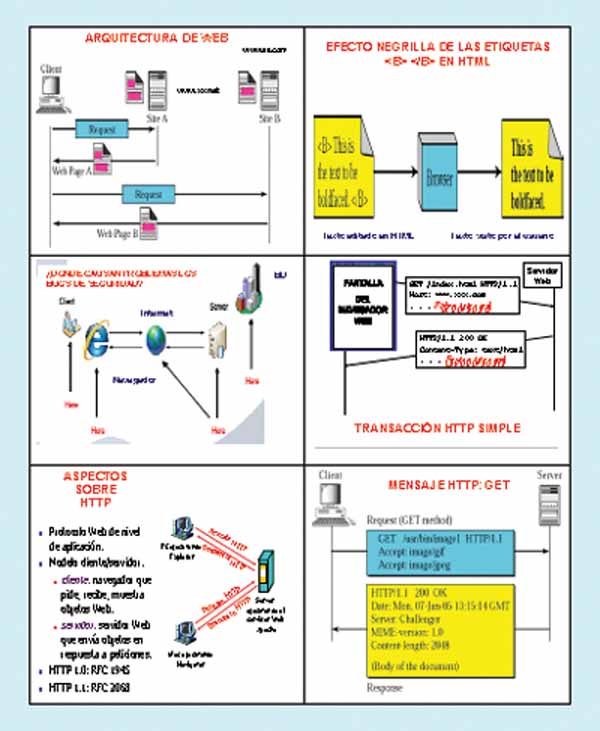
The main structural components of the Web are: (i) Clients/browsers. (ii) Servers. These run on sophisticated hardware with multi-core processors. (iii) Caches. These enable interesting implementations and reduce waiting times. (iv) The Internet. This is the global network infrastructure that facilitates data transfer under the TCP/IP protocol stack. The main semantic components of the Web are: (a) The HTTP (Hypertext Transfer Protocol). HTTP is a simple, stateless, request/response protocol that does not encrypt data. It is an application-level protocol in the TCP/IP protocol stack between a browser and a server, and when integrated with SSL/TLS, it forms HTTPS. Some HTTP request messages are: GET, the client requests a document from the server using a URL; PUT, sends a document from the server to the client; HEAD, retrieves information about the document specified by the URL, not the document itself; OPTIONS, retrieves information about available options; POST, the client sends information to the server, for example, annotation; DELETE deletes a document specified by a URL; TRACE echoes the incoming request; CONNECT is used by caches. The first type of HTTP message is the request. The client browser constructs and sends messages such as: a typical HTTP request is: GET http://www.labrs.com/index.html HTTP/1.0. The second type of message is the response. Web servers construct and send response messages. A typical HTTP response is: HTTP/1.0 301 Moved Permanently Location http://www.rs.com/lab/index.html. The web browser on the client side communicates with one or more servers. The browser makes a request, and the server responds with a response. To maintain state between requests, the server generates a session token. This identifier is passed between the browser and the server with each request/response. A cookie is a piece of data that can be passed with the request/response, for example, as a tracking cookie to learn about each user's preferences.
The HTTP versions are: (i) HTTP 1.0 (RFC 1945). It is a stop-and-wait protocol. It uses a separate TCP connection for each file. The connection is established and released for each file. It is characterized by inefficient packet usage. The server must maintain many connections during the time-wait. Clients make requests to port 80 of web servers, using DNS to resolve the server name to an IP address. Clients establish a separate TCP connection for each URL. Some browsers open multiple TCP connections (Netscape uses four by default). The server returns the HTML page. There are many types of servers with a variety of implementations. The Apache server is the most widely used and is freely available. The browser interprets the page and requests embedded objects. (ii) HTTP 1.1 (RFC 2068). It offers improved performance, uses persistent connections, pipelining, caching options, and supports compression. Persistent connections use the same TCP connection to transfer multiple files. It significantly reduces packet traffic and may or may not increase performance from the client's perspective if the server load increases. Pipelining involves bundling as much data as possible into a single packet. It requires a length field(s) within the HTTP header. It may or may not reduce packet traffic or increase performance. In this case, the page structure is critical. (b) Languages such as HTML (Hypertext Markup Language) and XML (Extensible Markup Language). HTML is a subset of SGML (Standardized General Markup Language) and facilitates an environment with embedded links to other documents and applications. HTML documents use elements to identify sections of text with different purposes or to display features, such as bold text. Markup elements are not visible to the user when viewing the page. Documents are presented by browsers. Not all web documents are HTML, and developers use WYSIWYG editors to generate HTML. (c) Naming mechanisms using URIs (Uniform Resource Identifiers).
Web resources need names/identifiers, that is, URIs. The resource can reside anywhere on the internet. URIs are an abstract concept: a pointer to a resource to which request methods can be applied to generate potentially different responses; the URI links to generic applications (http, ftp, telnet, etc.). A request method is, for example, searching for or modifying the object. The URL example: http://www.abc.com/index.html includes the protocol (http://, ftp://, telnet://, mailto://)
 STRIDE/DREAD Threat Modeling System for Web Applications.
The STRIDE/DREAD threat modeling system is based on: (1) STRIDE, which identifies the following threat categories: (i) Identity spoofing. Identity spoofing is a key risk in applications that have many users but use a single execution context at the application and database level. Users should not be able to impersonate any other user or become that user. (ii) Data tampering. Users can change any data delivered to them and can therefore change client-side validation, GET and POST data, cookies, HTTP headers, etc. The application should not send data to the user, such as interest rates or periods, that are obtainable within the application itself.
The application must carefully check any data received from the user to determine if it is accurate and applicable. (iii) Repudiation. Users may dispute transactions if there is insufficient tracking/traceability and auditing of user activity. For example, if a user says, “I am not transferring money to this external account,” and their activities cannot be tracked from the beginning to the end of the application, the transaction will most likely have to be reversed. Applications should have adequate repudiation controls, such as web access logs, audit logs at every level, and top-down user context. Ideally, the application should run as the user, but this is often not possible with many frameworks. (iv) Information Disclosure. Users are wary of disclosing private details to a system. If it is possible for an attacker to disclose user details, anonymously or as an authorized user, there will be a loss of repudiation. Applications must include strong controls to prevent tampering with user identity, particularly when using a single account to run the entire application. The user's browser can leak information. Not all browsers correctly implement the no-caching policies requested by HTTP headers. Each application has a responsibility to minimize the amount of information stored by a browser, in case information is leaked and an attacker can use it to learn more about the user or even impersonate that user. (v) Denial of Service. Applications should be aware that they can be the target of a denial-of-service attack. For authenticated applications, expensive resources such as large files, complex calculations, robust searches, or long queries should be reserved for authorized users, not anonymous users. For applications that do not have this luxury, every facet of the application should be implemented to perform as little work as possible, use fast database queries (or not), and avoid exposing large files or providing unique links per user to prevent a simple denial-of-service attack. (vi) Elevation of Privilege. If an application provides user and administrator roles, it is vital to ensure that the user cannot elevate themselves to higher privilege roles. Specifically, not providing user links is not enough; all actions must be controlled by an authorization matrix to ensure that only the correct roles can access privileged functionality. (2) DREAD. This is used to calculate the risk value, which is the arithmetic mean of five elements: Risk (DREAD) = (Damage + Reproducibility + Exploitability + Affected Users + Discoverability) / 5. It consists of: (i) Damage Potential. This measures the amount of damage caused if a threat is carried out. A value of zero means none, a value of five means that the data of an individual user has been affected or compromised, and a value of ten means the data of the entire system. (ii) Reproducibility. This measures how easily this threat can be reproduced. A value of zero means very difficult or impossible, even for application administrators. A value of five means that if one or two phases are required, it may need to be an authorized user. A value of ten means only a browser address bar without being logged in. (iii) Exploitability. Measure what is needed to exploit this threat. A value of zero means having advanced, custom-built attack tools, networking skills, and advanced programming; a value of five means that malware exists or that it is carried out using standard attack tools; and a value of ten means having only a browser. (iv) Affected Users. Measure how many users will be affected by this threat. A value of zero means none; a value of five means some users but not all; and a value of ten means all users. (v) Discoverability. Measure how easy it is to discover this threat. A value of zero means very difficult or impossible; it requires access to the system or source; a value of five means that it can be detected by examining network traces; a value of nine means that details of vulnerabilities like this are publicly available and can be discovered using high-performance search engines such as Google, Yahoo, etc.; and a value of ten means that it is in the address bar or in a form.
Common Web Vulnerabilities. Proactive Security Measures.
Several sources allow us to identify web vulnerabilities, threats, and security risks: (i) OWASP (Open Web Application Security Project) publishes an annual document called “Top 10 Mitigable Threats/Risks,” based on raw data from the MITRE CVE. (ii) SANS publishes an annual document called “SANS Top 20 Internet Security Attack Targets.” (iii) eEye Digital Security. (iv) Zero-Day Tracker. (v) US-CERT updates its information weekly. One vulnerability in web browsers like IE, Safari, etc., is their ability to automatically take actions to limit the impact of web page inconsistencies. For example, if a web page loses the closing `</body>` tag, the browser may display the page correctly or execute JavaScript even if the word is split across two lines within a `<script>` tag, one line indicating `java` and the other specifying `script`. Attackers exploit this vulnerability to cause a website to malfunction. There are widespread misconceptions about web application security, such as the idea that SSL/TLS protects a website, that conventional firewalls protect web applications, or that IDS/IPS protect web and database servers. Web application security cannot be addressed solely with antivirus software, vulnerability scanners, firewalls/DMZs, IDS/IPS, patch/compliance management, and server security. It also requires additional safeguards such as static analysis (some static analysis tool vendors include Veracode, Fortify, Coverity, KlocWork, and OunceLabs) and dynamic analysis (some dynamic analysis tool vendors include IBM with RationalAppscan, HP with WebInspect, Ntoobjectives with NTOSpider, Cenzic with Hailstorm, and Whitehat Security), web application/XML firewalls, code review and analysis, comprehensive SDLC protection, and developer training.
Reactive approaches to security breaches are insufficient and lead to an endless cycle of crises that often culminate in total disaster. Therefore, proactive protection measures are now essential, such as: (i) Integrated security testing throughout the software development lifecycle (SDLC). (ii) Re-testing and re-certification if there are significant changes to the system or web application environment. (iii) Reviewing the architecture and analyzing potential vulnerabilities (gaps). (iv) Implementing integrated security and defense-in-depth. (v) Using XML firewalls for web services, capable of mitigating threats such as SQL injection, external entity attacks, recursive payloads, schema poisoning, denial-of-service attacks, buffer overflows, etc., using WSDL verification, XML schema validation, XML content-based routing, etc.
Final Considerations
Our research group has been working for over twenty years in the area of security synthesis and analysis in the context of web applications.
This article is part of the activities carried out within the LEFIS-APTICE project (funded by Socrates, European Commission).
Author: Prof. Dr. Javier Areitio Bertolín – E.Mail:
Bibliography
- Areitio, J. “Information Security: Networks, Computing and Information Systems”. Cengage Learning-Paraninfo. 2010.
- Areitio, J. “New approaches in the analysis of systems for detection-prevention and management of attacks-intrusions”. Conectrónica Magazine. No. 123. January 2009.
- Fry, C. and Nystrom, M. “Security Monitoring. Proven Methods for Incident Detection on Enterprise 200.