From wireless authentication protocols to the environment in which the device is installed, numerous considerations must be taken into account when securing an 802.11 embedded device.
The top 10 considerations when protecting an 802.11 embedded device are:
1. Study the environment in which the application is installed.
This point is easy to overlook, but it is fundamental to application security. Embedded systems are installed in real-world environments. Physical security is of paramount importance for these systems, as an attack can compromise these devices much more easily through physical access. Furthermore, noise created by other applications in the same area (especially those using the same radio band) could wreak havoc on communications, and thus, a simple microwave oven can become an effective denial-of-service weapon.
2. Wireless networks are by definition less secure than wired networks (in theory).
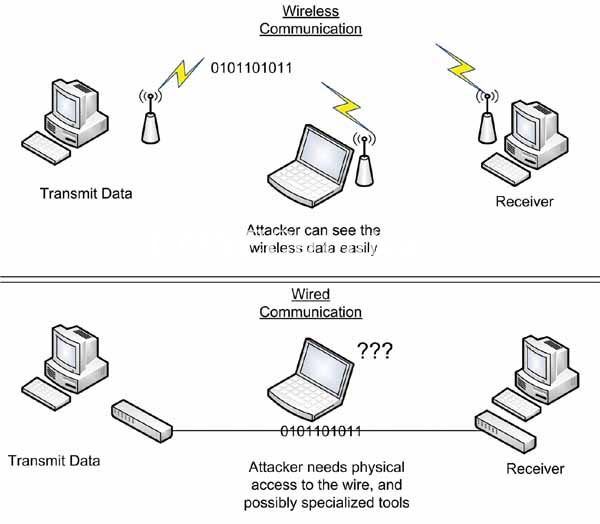
In a wireless network, information is constantly being retransmitted to anyone with a receiver. In a wired network, data travels through the cable, making it much more difficult to intercept. While a hacker could use an inductive sensor to measure this data, it's a much more sophisticated attack, and the cable can always be encased in a Faraday cage and buried in concrete. This isn't feasible with wireless networks. (See Figure 1).
3. Do not use WEP.
WEP (Wired-Equivalent Privacy) encryption was the method initially used to protect 802.11 networks. Unfortunately, the protocol was compromised almost from the moment of its release, and now it can be attacked in a matter of seconds with free software utilities. Despite this, a large number of devices were installed with WEP and continue to use it today. Think carefully before connecting using WEP, and if you ultimately choose this option, make sure to use additional authentication and encryption methods (see point 6).
4. WPA-TKIP is also not a highly recommended method.
WPA was developed in response to the breach of WEP encryption and was redesigned to work with the same hardware. Unfortunately, all indications are that it will also soon be phased out. It is not as vulnerable as WEP, but new attacks indicate that it is weak and will soon join WEP encryption in its demise. Fortunately, WPA2 was developed as a complete alternative (though not hardware-compatible). If you use Wi-Fi encryption, you should always choose WPA2.
5. Wi-Fi encryption (WPA, WPA2, etc.) is not enough; you need TLS or similar.
An important caveat to using Wi-Fi encryption protocols is that they only protect data while it travels between your device and the Wi-Fi access point. Once the data reaches the access point, it is decrypted and transmitted without any protection. This might not be a problem on a private company network, but if your device is connected to the internet, WPA2 is useless, as there is no security at that point. For this reason, it is advisable to use a higher-level security protocol such as Transport Layer Security (TLS) or Secure Shell (SSH). These protocols encrypt everything sent from your device to its destination, regardless of the network the data travels over.
6. Do you need enterprise authentication?
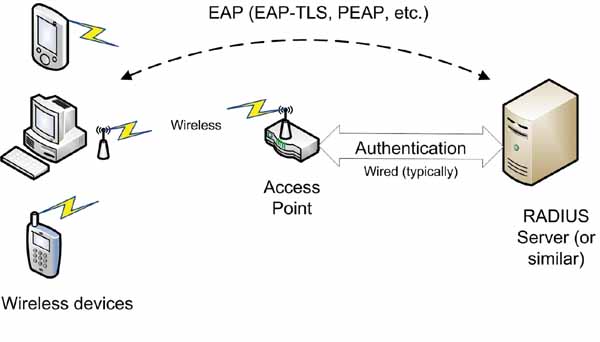
Authentication is an often overlooked aspect of security that is just as vital as encryption. Without authentication, a hacker could impersonate the legitimate recipient of information directly on your device. Authentication can be achieved by requiring a password, pre-sharing a secret key, using built-in authentication via TLS or similar protocols, or using enterprise authentication itself, which requires a dedicated authentication server to verify the identity of all devices. The most common authentication methods are EAP-TLS and PEAP. Enterprise authentication is a complex topic that will take some time to design, but for certain applications, it is the only option. (See Figure 2.)
7. How are certificates and keys established and managed?
Whether you use an authentication method or simply a pre-shared key, you will need to manage your digital keys or certificates (certificates are used in enterprise authentication and TLS). Each device should have a unique certificate or key for maximum security. You can distribute the same key to all devices, but if one device is compromised, the entire system will be at risk. Using the same certificate on all devices is slightly more difficult, as the authentication mechanism assigns a certificate to the device's address. In any case, you will need to devise a way to distribute keys and certificates and update them as needed (frequent key updates are recommended for enhanced security).
8. Wi-Fi security protocols are slow and resource-intensive.
If you're developing an embedded application with hundreds of thousands of units, the cost per unit can be a problem. This means you'll have to compromise on device performance, but keep in mind that encryption consumes significant processor resources (and sometimes memory), and that Wi-Fi security protocols are designed for maximum security, with performance being a secondary consideration. When assessing hardware requirements, ensure they are tailored to the level of security you need.
9. What is your network infrastructure?
If your device is directly connected to the internet, the types of problems you'll encounter are very different from those you'd face connecting to a private network that you control. You should also consider potential points of failure; for example, if all devices communicate with a single access point, that access point becomes a single point of failure for the entire system and the most likely target of any attack. Adding redundancy to your infrastructure can mitigate this type of security problem.
10. Don't forget that the weakest link in any security system is the user.
In any system, the user is by far the weakest link. Overly simple passwords, writing passwords down on scraps of paper, or simply carelessness are often the factors that guarantee a successful attack. Keeping all of this in mind, you can take several steps to try to prevent users (including yourself) from causing problems. Require passwords to be updated frequently and check their length (8 characters is fine, but more is better) and content (make sure there are non-alphanumeric characters and a combination of letters and numbers). You should also consider who has access to the system, and it's not a bad idea to limit what users can do; that's why most operating systems have different permission levels.
The proliferation of wireless networks is happening and will continue to evolve. That's why it's vitally important for manufacturers to stay ahead of hackers to ensure their wireless networks and devices are secure. By following these important tips, organizations can ensure that their confidential information is safe from predators.
Author: Timothy Stapko, Chief Software Engineer and Project Manager at Digi International.
About the author:
Timothy Stapko is a senior software engineer at Digi International. Stapko has over 10 years of experience in the software industry and is the author of "Practical Embedded Security".