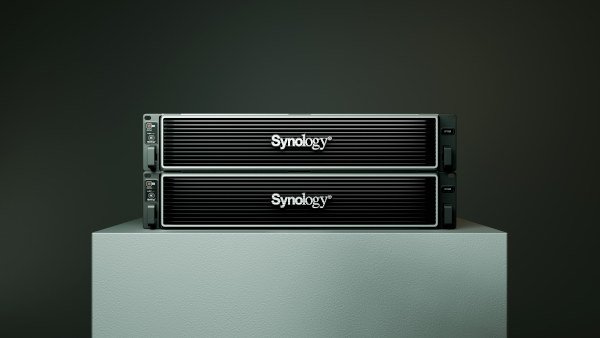
The box contains the DP320 main unit, two 3.5" SATA HDDs, one power adapter, one AC power cable, two RJ-45 LAN cables, one accessory pack, and a quick installation guide.
It is certified by FCC, CE, UKCA, BSMI, RCM, NCC, and VCCI.
The unit measures 166 x 106 x 223 mm and weighs 2.9 kg. It operates in environments with temperatures between 0 and 45 degrees Celsius and relative humidity between 8 and 80%.

Hardware Overview:
The DP320 features a compact desktop form factor with a dual-bay design, supporting two 8TB Synology HAT3310 enterprise-class SATA hard drives configured in RAID 1 for redundancy. The device's exterior closely resembles other Synology models, such as the DS723+, but it lacks features like NVMe slots and 10GbE networking capabilities, emphasizing its specialized role in backup operations.
Internal Components
: Processor: AMD Ryzen R1600 Dual-Core CPU;
Memory: 8 GB ECC DDR4 RAM (2 x 4 GB modules)
; Storage: Pre-installed with two 8 TB Synology HAT3310 drives in RAID 1.
With an average speed of 230 MB/s, this will be sufficient to handle any data transfer over that 1 Gbps network connection. Of course, a real-world test will yield a much better result.
Network interfaces:
1 x 1 GbE RJ-45 for management,
1 x 1 GbE RJ-45 for data transfer.
USB ports: 1 x USB 3.2 Gen 1 (limited functionality within APM).
Without the 10G option, unlike the DP340 model, the DP320 is limited to 1G network speeds. This indicates that its target audience is businesses and individuals who don't require frequent or intensive data transfers.
With this model, we can be confident that, including unpacking and APM installation, we can perform our first backup in 10 minutes.
The drives don't require screws (unless using 2.5" drives), and the fact that there are only two, instead of 12, speeds up the process.
The DP320's hardware is designed to deliver reliable backup performance, rather than high-speed data processing or virtualization. Its lack of scalability and advanced networking options may limit its suitability for larger organizations with more demanding requirements.

ActiveProtect Manager (APM)
is Synology's dedicated platform for centralized backup and disaster recovery management. It offers a unified dashboard for monitoring backups across various environments, including physical devices, virtual machines, and cloud platforms.
Key Features
- Centralized backup management.
- Customizable protection plans: Define backup schedules, retention policies, and destinations tailored to specific workloads.
- Enhanced data security: Implement immutability, physically isolated backups, and encryption to protect your data.
- Hybrid backup support: Integrate Synology C2 cloud services and other remote storage solutions.
- Recovery options: Support full restore, file-level recovery, and instant virtual machine restore.
- Deduplication and compression to optimize storage efficiency.
- User and access management: Use role-based permissions and integrate domain/LDAP systems.
- Supports VMware and Hyper-V for virtual machine backups.
- Provides real-time insights into backup operations and storage trends.
- Suitable for small and medium-sized businesses, with options for larger configurations using more advanced data protection models.
One of the most common backup scenarios is backing up a computer, whether it's a Mac, any of the many PC variants running Windows or Linux.
By default, backups will be triggered according to the actual schedule, but you can also run them manually.
Keep in mind that backups won't run in parallel, but sequentially, one at a time. This way, network bandwidth will be used at its maximum possible speed, and the deduplication mechanism will be activated after the first backup, minimizing data transfer and the storage space required.

In practical situations, the DP320 demonstrates efficient backup performance. For example, backing up two virtual machines with a total size of approximately 100 GB (49 GB + 49 GB) of data would take about 23 minutes (about 18 minutes for the first and 5 minutes for the second), and subsequent deduplicated backups would be completed in just 5 minutes. For 100 GB of data, the actual space used is less than 40 GB.
This efficiency makes the DP320 suitable for environments with multiple similar systems, such as offices with standardized workstations. That is, for an office with about 10 computers of the same specifications (with differences only in the data stored by each user), a Synology DP320 device takes 18 minutes to perform the first backup, and the rest take about 5 minutes each, making the total backup time for the entire office about one hour.
Any backup after the initial one will likely be very quick, and even a daily backup will be completed in a matter of minutes.
Unlike restoring a single file through the Recovery Portal, a full restore involves restoring the entire computer, including the operating system and data.
Depending on the computer's size and speed, the backup and restore process may take some time. In the example above, it took only 4 minutes to restore approximately 30 GB of used space (100 GB total partition size) over a 1 Gbps network on a quad-core computer with 8 GB of RAM and an NVMe drive.
The transfer speed was constant at around 120 MB/s, which is the maximum speed of the DP320's 1 Gbps port.
Regarding overall device utilization during this task, CPU and RAM usage was moderate.
With two of the four cores at maximum (100%), only 2.5 GB of RAM in use, and the network fully saturated, it's clear the DP320 has sufficient power to handle additional tasks. Even in a RAID1 configuration, this setup appears capable of supporting a 2.5G interface for data transfer.
Network limitations:
The DP320's reliance on 1 GbE network interfaces can become a bottleneck in data-intensive environments. Unlike its sibling, the DP340, which offers a 10 GbE data transfer port, the DP320's networking capabilities may limit its applicability in scenarios requiring high-speed data transfers.
Practical Use Cases
One of the most common scenarios is backing up workstations in offices. For example, backing up 10 standard computers can be achieved in under an hour: the first backup takes about 18 minutes, and subsequent backups only 5 minutes thanks to deduplication.
But its effectiveness extends beyond small environments. A great example is the real-world case of Toyota, where Synology was key to implementing a modern, centralized, and scalable backup system.
Read the full case study here: Toyota + Synology
In conclusion
, the Synology DP320 represents a strategic shift towards specialized backup devices, offering optimized data protection through the ActiveProtect Manager platform.
It addresses a specific need: simplifying backup management. Its closed configuration, clear focus, and ease of use make it an attractive option for businesses looking to reduce technical complexity without sacrificing reliability. It's not intended for those seeking a versatile NAS, but rather for those who prioritize data protection above all else.
More product information: https://sy.to/infoconectronicadp
Where to buy in Spain: https://www.synology.com/es-es/wheretobuy?name=Spain&tab=Online