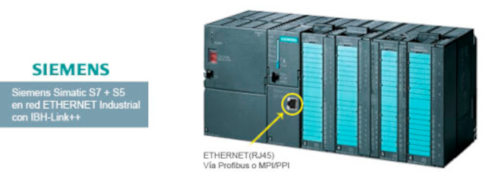
The driver for SIMATIC MicroWin, STEP7, WinCC, ProTool, and, of course, S7 for Windows® is supplied on CD with your IBH Link S7++. You can also use the IBH OPC server to connect your visualization to the PLC via the IBH Link S7++. The IBHNet driver allows you to gain direct variable access through standard programming languages such as Visual Basic or Delphi. Setting up the adapter is very easy and usually takes only a few minutes. The IBH Link S7++ automatically detects whether it is connected to a 10 or 100 Mbit/s network. The IBH Link S7++ is powered from the MPI/DP interface, if available; otherwise, via the integrated 24V socket.
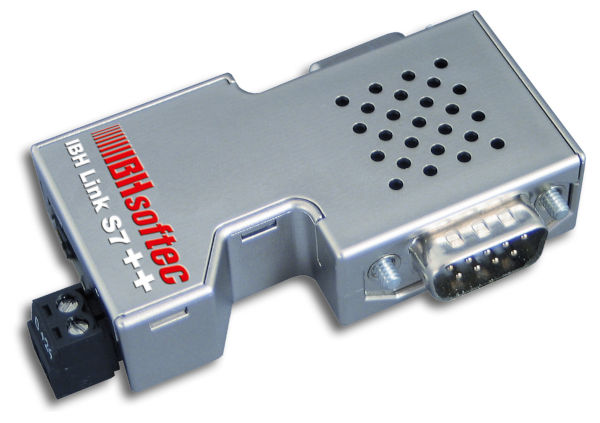 The IBH-Link-S7 is a small gateway/bridge integrated into a Sub-D9 connector:
• The IBH-Link connects to an Ethernet hub or switch, or directly to the PC's network card.
• The protocol used is based on Ethernet TCP/IP, allowing access to all Simatic S7 and S5 devices on the local network and the internet using VPN (encrypted connection protected against hackers) or directly through the firewall and router behind a static or public IP address.
• With the IBH-Link, online functions are possible via Profibus DP (up to 12 Mbit/s) or via PPI/MPI.
• The IBH-Link reduces costs because it does not require special PCs and uses the standard Siemens Simatic S5 and S7 protocols.
• The IBH-Link includes an interface for use with Simatic MicroWin®, Step7, WinCC, Protool, and, of course, S5+S7 for Windows. The software is supplied on the IBH-Link CD.
• The reliability of IBH-Link is backed by hundreds of users who have already experienced its advantages and efficiency in terms of easy installation, in addition to the obvious cost savings.
• You can also use OPC Server from IBH-Softec, INAT, Kep-Ware, and others to view S7 and S5 PLCs and controllers through IBH-Link.
• The IBHNET DLL allows direct and quick access to all variables in all PLCs through standard programming languages such as Visual Basic, Visual C++, Delphi, etc.
• It allows you to view the diagnostics of Profibus nodes online through a web browser.
• Configuring IBH-Link is very simple and takes only a minute.
• IBH-Link supports 10 or 100 Mbit/s networks with auto-detection.
In addition to programming capabilities, an application programming interface (API) for HMI applications is also included.
For Windows operating systems, examples are available in Visual Basic, Visual C, Visual C++, VB.NET, Visual C#, Delphi, Java, and Excel. Samples are also included for Linux. After installation, the samples can be found in: \ IBH softec GmbH \ IBH_Net \ Samples. HMI applications can also be connected via ISO over TCP (RFC1006).
For Siemens S7 PLCs:
• S7-200 via PPI, with the IBH-Link S7++.
• S7-300 via Profibus or MPI, with the IBH-Link S7++.
• S7-400 via Profibus or MPI, with the IBH-Link S7+.
• Enables communication between Siemens PLCs and FDT applications.
• Profibus, MPI, and PPI on the DB9 connector.
• Ethernet on the RJ45 connector.
• Optional power supply: 24 Vdc.
IBH Link S7++ with CommDTM:
IBHSoftec now offers free DTM communication for the popular IBH Link S7++. With DTM communication (CommDTM), the IBH Link S7++ can be used for configuring and parameterizing field devices based on Field Device Tool (FDT) technology. CommDTM can be used within FDT applications such as PACTware or FieldCare and provides communication with PROFIBUS.
 For Siemens S5 PLCs:
• S5-xxx via PG-Port (AS511 protocol), with IBH-Link S5++.
• PG port (AS511 protocol) on the DB15 connector.
• Ethernet on the RJ45 connector.
• Power supply: 24 Vdc.
Methods for accessing data in the PLC:
• Via OPC Server (Windows).
• Via DDE Server (Windows).
• Via ActiveX (Windows).
• DLL function calls (Windows).
• Direct communication via TCP Socket (Any OS).
Methods for programming an S7 PLC via IBH-Link:
• Using IBHsoftec's S5 + S7 software for Windows.
• Using Siemens' Step7 software.
PLC data access from other software systems:
• Simatic WinCC.
• Simatic MicroWin®.
• Simatic Step7.
• S7 for Windows.
• Protool.
• Prodave.
• VB: Visual Basic.
• VBA: Visual Basic for Applications.
• VC++: Visual C++.
• Delphi.
• LabVIEW.
S5, S7, or S5+S7 for Windows:
Software for the efficient and user-friendly management and programming of Siemens Simatic S5, S7-200®, S7-300®, and S7-400® PLCs. Fast software with excellent organization and infrastructure. A lightweight version of Step7 that works for both S5 and S7.
• S5+S7 for Windows + a PC: Can replace Siemens PG programming kits
• Instruction List (AWL / STL)
• Function Block Diagram (FBD)
• Layout Diagram (LAD)
• Printing of program and configuration documentation
• Import and export between S5+S7 and Step5 and Step7 respectively
• BlockDiff, comparison of software blocks
• PLC Doctor S7 (diagnostics and general analysis), access S7 even without the software source code
• Oscilloscope to view the dynamics of variables in the PLC memory
• S5 and/or S7 software simulation